How Snapkit Generates QR Codes in Your Browser
What the Snapkit homepage actually does: client-side payloads, PNG export size, which fields exist per type, and what we store only if you use dynamic codes.
Most QR sites upload whatever you type, render a code on a server, and keep a copy. Snapkit’s free generator on the homepage does not work that way. The page is a JavaScript app. It formats your input in the tab, draws a QR on a canvas, and lets you download a PNG. If you never create an account, the URL, Wi‑Fi password, or vCard you typed is not a record in our database.
I built it this way because the usual “paste a link, we email you a login” loop is why people bounce. It is also why AdSense reviewers treat QR tools as empty utilities: the product looks like a black box. This article is the missing product documentation—what the controls do, what the file is, and where the privacy line actually is.
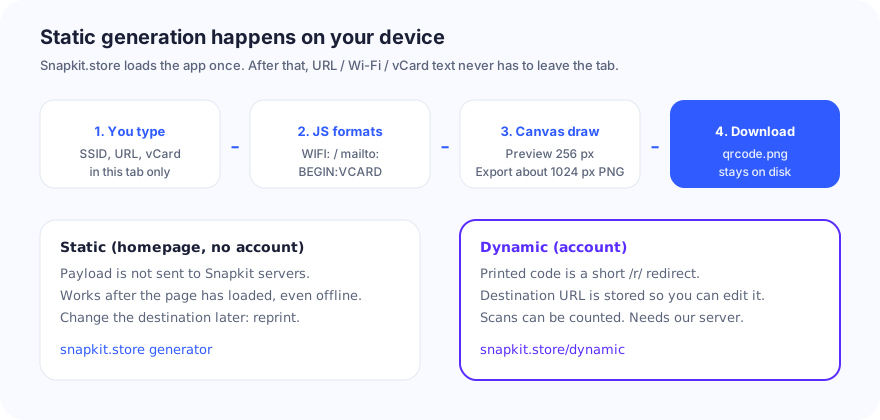
What leaves the browser, and what does not
| You are doing | Data Snapkit receives | Data that stays on your device |
|---|---|---|
Static QR on / (no account) | Normal page analytics (if you have not opted out of cookies) | The payload: URL, text, Wi‑Fi PSK, vCard fields, SMS body, mailto draft, phone number |
| Custom colors / logo / dot style (paid customization) | Account / entitlement check so we know you can download a styled file | The logo file you pick is read locally for the canvas |
| Dynamic QR (signed in) | Destination URL, name, short code, later scan metadata | The printed pattern still encodes only our short link |
| Scanning someone else’s code | Nothing from their camera—we are not a scanner app | n/a |
The legal detail lives on the privacy policy. The practical version: do not treat a static download as “Snapkit has my Wi‑Fi password.” Treat the print as public. Anyone who photographs the code can decode it. We never needed a copy to make the PNG.
How a static code is built
- You pick a type tab: URL, Text, Wi‑Fi, Contact, SMS, Email, or Phone.
- The form builds a string. Empty required fields produce no downloadable code (the preview shows a placeholder).
- A 300 ms debounce updates the preview so we are not redrawing on every keystroke.
- Preview canvas is 256 px. Download renders closer to 1024 px PNG so you are not printing a screenshot of the widget.
- There is a practical length cap (warning near 1,000 characters, trouble past about 1,200). Denser payloads need a larger print.
After the JavaScript has loaded, you can lose the network and still generate static codes. You cannot create or edit dynamic codes offline; those need an account and our redirect service.
Fields the tool actually has
I am listing only what the form exposes. If a field is not here, Snapkit does not generate it—even if the underlying spec allows more.
| Type | You enter | What gets encoded |
|---|---|---|
| URL | Address | The string as typed (add https:// yourself) |
| Text | Free text | Exact text |
| Wi‑Fi | SSID, password, WPA/WEP/nopass, hidden checkbox | WIFI:T:…;S:…;P:…; plus H:true; if hidden |
| Contact | Name, phone, email, optional company / website / address | vCard 3.0 (FN, N, TEL, EMAIL, ORG, URL, ADR) |
| SMS | Number, optional message | SMSTO:number:message |
| Address, optional subject and body | mailto: with encoded query params | |
| Phone | Number | tel: plus the number |
Not in the Contact form: job title, photo, second phone, birthday. The vCard guide explains the format; the homepage will not emit TITLE: unless you paste a full vCard into Text (phones then may or may not offer Save Contact).
Not a separate tab: calendar events, geo: pins, Bitcoin, hosted forms. Use URL mode with a maps, wallet, or form share link, or Text for a raw string. Maps HTTPS construction is Google Maps location QR codes. Calendar templates are calendar event QR codes. Form /viewform construction is survey & Google Form QR codes. There is a dedicated article on Bitcoin wallet codes if that is the job.
Dynamic toggle appears for URL only. A Wi‑Fi password is not a redirect. You cannot remotely change a printed WIFI: or tel: string.
PNG export, not SVG
The download button saves PNG. That matches what most printers and Canva-class tools expect. We do not currently hand you an SVG from this button. If you need vectors for a billboard, that is a different workflow—see PNG vs SVG—but do not assume the homepage exports SVG.
For print DPI math and quiet zone, use the existing print and size guides. A 1024 px file at 300 ppi is roughly 3.4 inches on a side before you scale. Scaling down is fine. Scaling a 256 px screenshot up is how edges go mushy.
Customization (what is gated)
The homepage can change module color, background, corner/dot style, and a center logo. Those downloads are entitlement-gated (signed-in plan or trial). The default black-on-white static code is not. Contrast still matters more than branding; light gray on white will fail for the same reasons as in the color guide.
A logo spends error-correction budget. Keep it small and test on an iPhone and an Android after you apply the real print finish.
Dynamic codes are a different product
If you check “make this dynamic” on a URL, you are no longer in the fully local path. The printed QR encodes a short Snapkit link. We store the destination so you can edit it and, on paid plans, see scan counts. That is documented on /dynamic and in static vs dynamic.
| Static PNG | Dynamic short link | |
|---|---|---|
| Account | Not required | Required |
| Edit after print | No | Yes (destination) |
| Works if Snapkit is down | Yes (data is in the picture) | Scan hits our redirect first |
| Analytics | No | Yes, per plan |
| Wi‑Fi / vCard / SMS / email / phone | Yes | URL destinations |
Use static for Wi‑Fi signs, vCards, and anything that must work at a wedding with dead LTE. Use dynamic when the landing page will move and the print cannot.
A short “is this working?” list
- Preview is not a download. Use the button; do not screenshot the 256 px box for a press run.
- Scan the PNG on a second phone before you order 500 cards.
- If the camera locks but the action is wrong, you used the wrong tab (text vs URL vs
mailto:). - If the camera will not lock, it is size, contrast, or crop—not “the generator is broken.” Start at QR code won’t scan.
- Wi‑Fi join failures after a good scan are usually SSID typos, encryption type, or a password you rotated. The Wi‑Fi guide covers the
WIFI:string.
Who writes this
I am Andrei Haiducu. I operate Snapkit through Haiducu Development. If this description does not match what you see on the site, email [email protected]—that is a product bug, not a “contact form.” More on About and Contact.
The generator is the product. This page exists so a human (or a reviewer) can see how it works without inventing a server we do not have.
Ready to create your QR code?
Try Snapkit's free QR code generator - no signup required.
Generate QR Code