QR Code Size Guide: How Big Should Your QR Code Be?
Learn the ideal QR code size for business cards, posters, billboards, and packaging. Includes a distance-to-size chart and printing best practices.
The Scan That Wouldn't Scan
You've seen it happen. Someone holds their phone up to a QR code on a poster, squints, zooms, moves closer, moves back—nothing. The code's there, the phone's there, but the scan fails. Nine times out of ten, the problem is size. The code is too small for the distance, or the distance is too great for the code.
Getting QR code sizing right matters. Too small and nobody can scan it. Too large and you're wasting space—or packing so much data that modules shrink. Here's how to get it right, with numbers you can hand to a designer or printer.
The Minimum Size Rule
For handheld scanning—someone standing within arm's length, phone in hand—your QR code should be at least 2 cm × 2 cm (about 0.8 in × 0.8 in). That's the bare minimum for reliable scanning with modern smartphone cameras.
Why? QR codes are made up of small square modules. When the code is too small, the camera can't distinguish individual modules clearly. The result is a blurry, unscannable mess.
On something like a business card, where scanning distance is always close, 1.5–2 cm (0.6–0.8 in) works well. For anything people might scan from farther away, you need to scale up. If you're unsure, err on the side of larger—wasted white space is cheaper than a reprint.
Module Size vs Version Density
Physical size on the page is only half the story. The version of the QR code—how many modules wide the symbol is—depends on how much data you encode. A short URL might be Version 3 (29×29 modules). A long URL, a full vCard, or a dense Wi‑Fi string can push you to Version 10 or higher (57×57 modules and up).
Module size is printed width ÷ module count. A 3 cm (1.2 in) Version 5 code (37 modules) yields ~0.81 mm (0.032 in) per module; at 1.5 cm (0.6 in), modules fall to 0.41 mm—shaky in dim light.
Shorter payloads = fewer modules = more forgiving at small sizes. Use a short link or dynamic QR code for long URLs; budget extra size for vCards or dense Wi‑Fi strings. See how QR codes work for versions and error correction.
The Distance-to-Size Ratio
A useful rule of thumb: your QR code should be about 1 in (2.5 cm) for every 10 ft (3 m) of scanning distance.
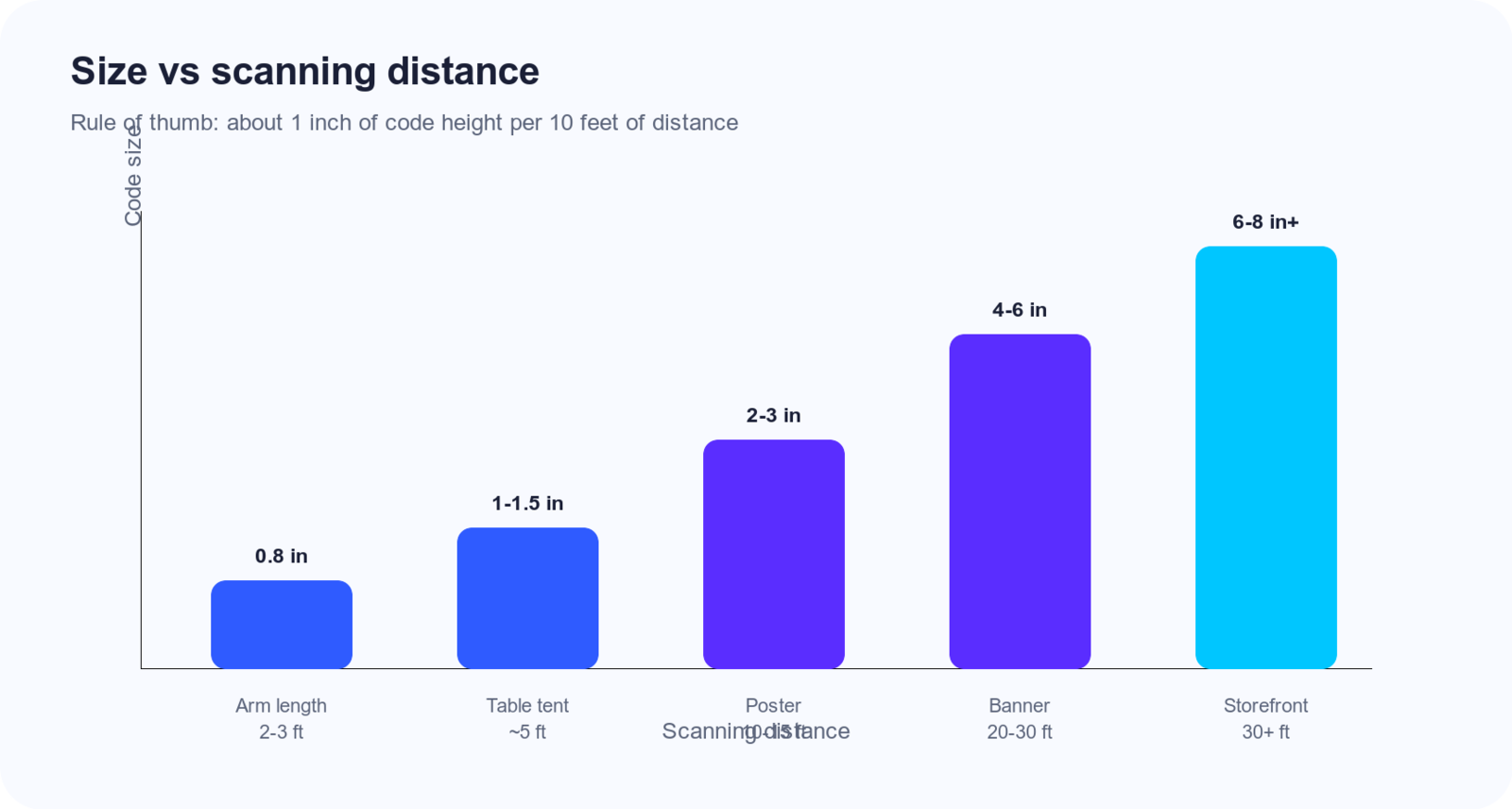
So if someone will be scanning from 5 ft (1.5 m)—a table tent on a restaurant table—your code needs to be at least 0.5 in (1.3 cm). From 20 ft (6 m), a poster on a wall, you need 2 in (5 cm) minimum. From across the street at 50 ft (15 m), you're looking at 5 in (12.7 cm) or more.
This isn't exact science—camera quality, lighting, and data density all play a role—but it's a solid starting point. When in doubt, go bigger.
Size by Use Case
Here's a practical reference for common scenarios (metric and imperial):
| Use Case | Recommended Size | Notes |
|---|---|---|
| Business cards | 1.5–2 cm (0.6–0.8 in) | Handheld, always close; don't go below 1.5 cm |
| Table tents, menus | 2.5–4 cm (1–1.5 in) | Diners scan from across the table |
| Posters (3–5 ft / 1–1.5 m viewing) | 5–8 cm (2–3 in) | Trade show booths, lobby signs |
| Banners (10–15 ft / 3–4.5 m) | 10–15 cm (4–6 in) | Conferences, storefronts |
| Store signage (20+ ft / 6+ m) | 15–20 cm (6–8 in) | Aisle signs, window displays |
| Billboards (50+ ft / 15+ m) | 30+ cm (12+ in) | Highway or building signage |
For very large formats like billboards, work with your printer—they'll often recommend specific dimensions based on the actual viewing distance and substrate.
Outdoor, Vehicle Wraps, and Harsh Environments
Outdoor codes fight glare, rain, and distance—add 20–40% to indoor size for the same viewing distance.
Vehicle wraps: use a flat panel (door, quarter panel), not a crease. Target 7.5–10 cm (3–4 in) for walk-by; 15–20 cm (6–8 in) only where drivers can scan safely and legally. High contrast, no gray-on-silver; test after install.
Fencing and yard signs: assume 10–20 ft (3–6 m). Pair size with print best practices—matte laminate and no shadows across the quiet zone.
Digital Screens: TV, Kiosks, and Phone Lock Screens
Screens care about apparent size in the viewer's field of view, not display diagonal.
TV / digital signage: At 10–15 ft (3–4.5 m), the code may need 15–25% of screen width to match a 4–6 in (10–15 cm) print at the same distance. Export a sharp PNG—CMS recompression softens modules (PNG vs SVG).
Lock screens: arm's-length scans; 2–3 cm (0.8–1.2 in) on the display works if contrast is strong and the clock/notifications don't eat the quiet zone.
Websites: 120–160 px wide on mobile for close scans; desktop "scan from the chair" behaves like a small poster—aim for 5+ cm (2+ in) equivalent on screen.
Packing Density Mistakes
Teams often shrink the QR to make room for copy, logos, or legal text—and kill scannability in the process.
- Logo inside the code without extra size or error correction.
- Long static URLs instead of a short or dynamic link.
- Upscaling a tiny PNG in Canva/InDesign—the layout box is big; the pixels aren't.
- Cropping the quiet zone for alignment.
If the layout only fits 1 cm (0.4 in), change the layout—not the minimum size rule.
Factors That Affect Scannability
Size isn't the only variable. These factors matter too:
Data density. A QR code with 10 characters (a short URL) has larger, clearer modules than one with 500 characters. Shorter content = smaller code that still scans well. If you're encoding a long URL, consider a URL shortener first.
Contrast. Dark modules on a light background scan best. Low contrast—gray on cream, or light blue on white—reduces reliability. See our design guide for more.
Print quality. Blurry, pixelated, or low-resolution prints fail even when the size is right. For print, use high-resolution files (PNG or SVG) and ensure your printer isn't scaling poorly.
When scans fail despite "correct" dimensions, walk through why QR codes won't scan before you reprint.
The Quiet Zone Requirement
Every QR code needs a quiet zone—a margin of white space (or background color) around all four sides. This border helps scanners detect where the code starts and ends.
The quiet zone should be at least 4 module widths on each side. In practice, that's about the width of one of the corner finder squares. If your layout cuts into this zone—trimming the code too close to the edge of a card, or placing it against a busy background—scanning reliability drops.
When you generate your QR code, leave some padding in your design. Don't crop it edge-to-edge.
Pre-Print Size Checklist
Run through this before you sign off on a proof:
| Step | Question | Pass? |
|---|---|---|
| 1 | Is printed size ≥ 2 cm (0.8 in) for close-up use? | |
| 2 | Does size meet ~1 in per 10 ft (2.5 cm per 3 m) for the farthest expected scan? | |
| 3 | Is the payload as short as possible (short URL / dynamic if needed)? | |
| 4 | Is quiet zone clear on all four sides? | |
| 5 | Is contrast high (dark on light or vice versa)? | |
| 6 | Did you export at sufficient resolution (no upscaling from a tiny file)? | |
| 7 | Did you test on iPhone and Android at real distance? | |
| 8 | For outdoor / vehicle / glossy stock, did you add size margin and matte where possible? |
Testing Before Printing
Before you commit to a large print run:
- Print a test at actual size. Don't rely on screen preview. Print the QR code at the exact dimensions you plan to use.
- Scan with multiple devices. Try iPhone and Android. Older phones have weaker cameras; if your audience might use them, test with one.
- Test at the real distance. If your sign will be on a wall 10 ft (3 m) away, stand 10 ft away and scan. If it's on a table tent, sit across the table and try.
A few minutes of testing can save you from reprinting hundreds of unusable pieces.
Get the size right from the start. Create your QR code with Snapkit, download a high-resolution file, and scale it for your use case. Pair with the print guide before production.
Ready to create your QR code?
Try Snapkit's free QR code generator - no signup required.
Generate QR Code