How QR Codes Work: A Complete Guide
Learn how QR codes encode data, use error correction, and get scanned by phones—plus practical tips for creating codes that print and scan reliably.
What is a QR Code?
A QR code (Quick Response code) is a two-dimensional barcode: a grid of dark and light modules that stores data both horizontally and vertically. That 2D layout is why a QR code can hold far more information than a traditional UPC-style barcode—typically a full URL, Wi‑Fi credentials, a contact card, or a short message.
When you point a phone camera at a code, the software finds the pattern, corrects for angle and damage, decodes the payload, and opens the matching action (browser, Wi‑Fi join sheet, Contacts app, and so on).
At Snapkit, static QR codes are generated entirely in your browser and downloaded as high-resolution PNG files. Nothing you type for a static code is uploaded to our servers.
The Anatomy of a QR Code
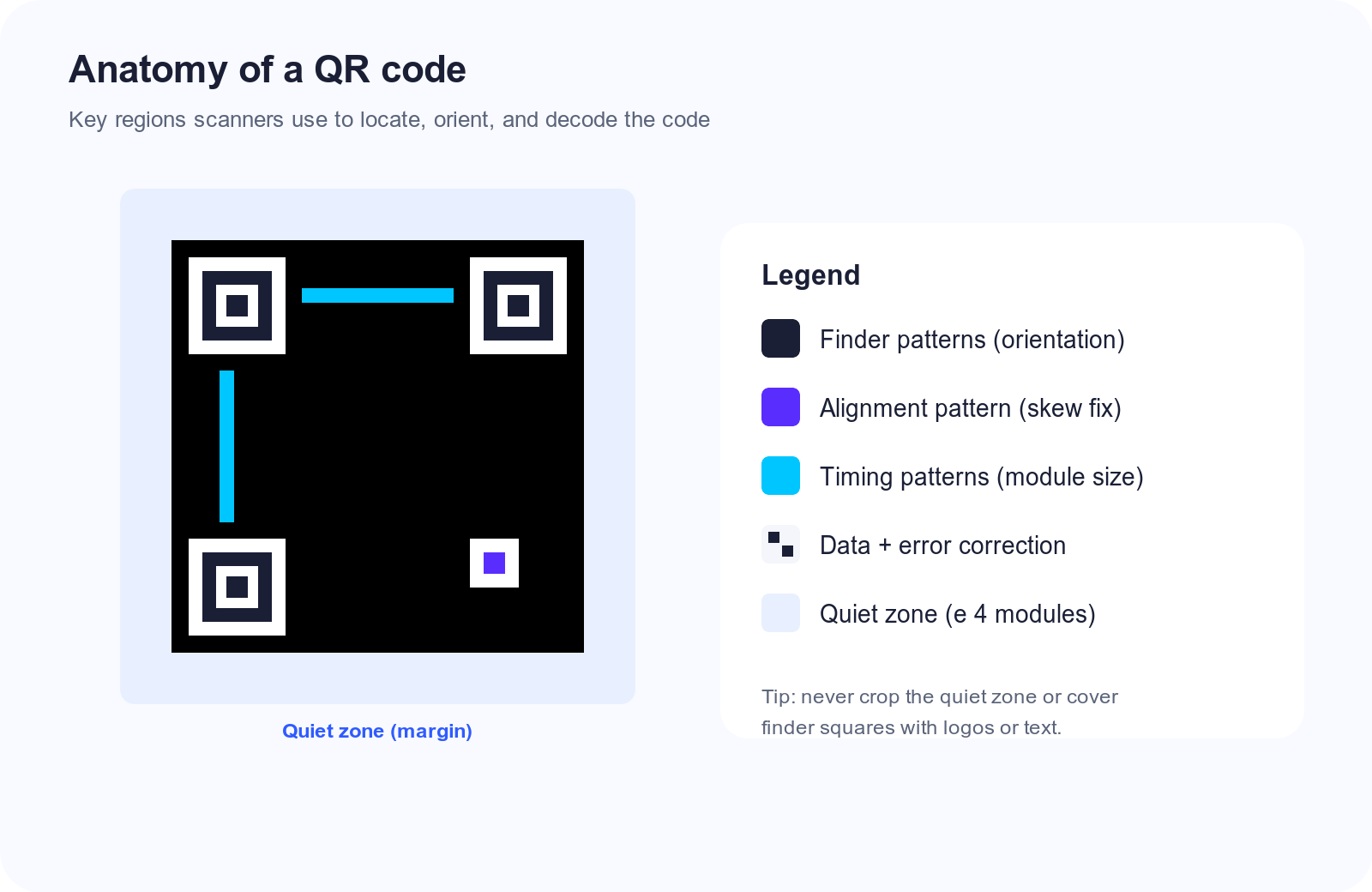
Every standard QR code shares the same structural building blocks. Understanding them helps when you customize colors or add a logo without breaking scans.
Finder Patterns
The three large nested squares in the corners (usually top-left, top-right, and bottom-left) tell the scanner “this is a QR code” and which way is up. They are identical regardless of the data inside.
Alignment Patterns
Smaller squares (more of them on larger codes) help the scanner stay accurate when the printed code is warped, photographed at an angle, or slightly distorted on flexible packaging.
Timing Patterns
Alternating dark/light modules between finder patterns let the reader measure module size—the “pixel” of the QR grid—so denser codes still decode correctly.
Quiet Zone
The blank margin around the code is not optional decoration. Most scanners need at least four modules of clear space on every side. Cropping a download too tightly is one of the most common reasons a “perfect” code fails in the real world.
Data and Error Correction
The remaining modules carry your payload plus Reed–Solomon error-correction symbols. Those extra bits are why a code can still scan when part of it is dirty, scratched, or covered by a small logo.
How Data Gets Encoded
QR codes support several encoding modes. Generators pick the most efficient mode for your content:
| Mode | Best for | Rough capacity (max versions) |
|---|---|---|
| Numeric | Digits only | Up to ~7,000 digits |
| Alphanumeric | Letters, digits, limited symbols | Up to ~4,000 characters |
| Byte | URLs, UTF‑8 text, most real content | Up to ~2,900+ bytes |
More data means a denser pattern (higher “version” of the QR spec). Denser codes need more print size and better camera focus. Practical rule: keep URLs short. If a campaign link is long, use a short redirect or a dynamic QR code so the printed pattern stays simple while the destination can change later.
Error Correction Levels
QR codes offer four recovery levels. Higher levels survive more damage but increase density:
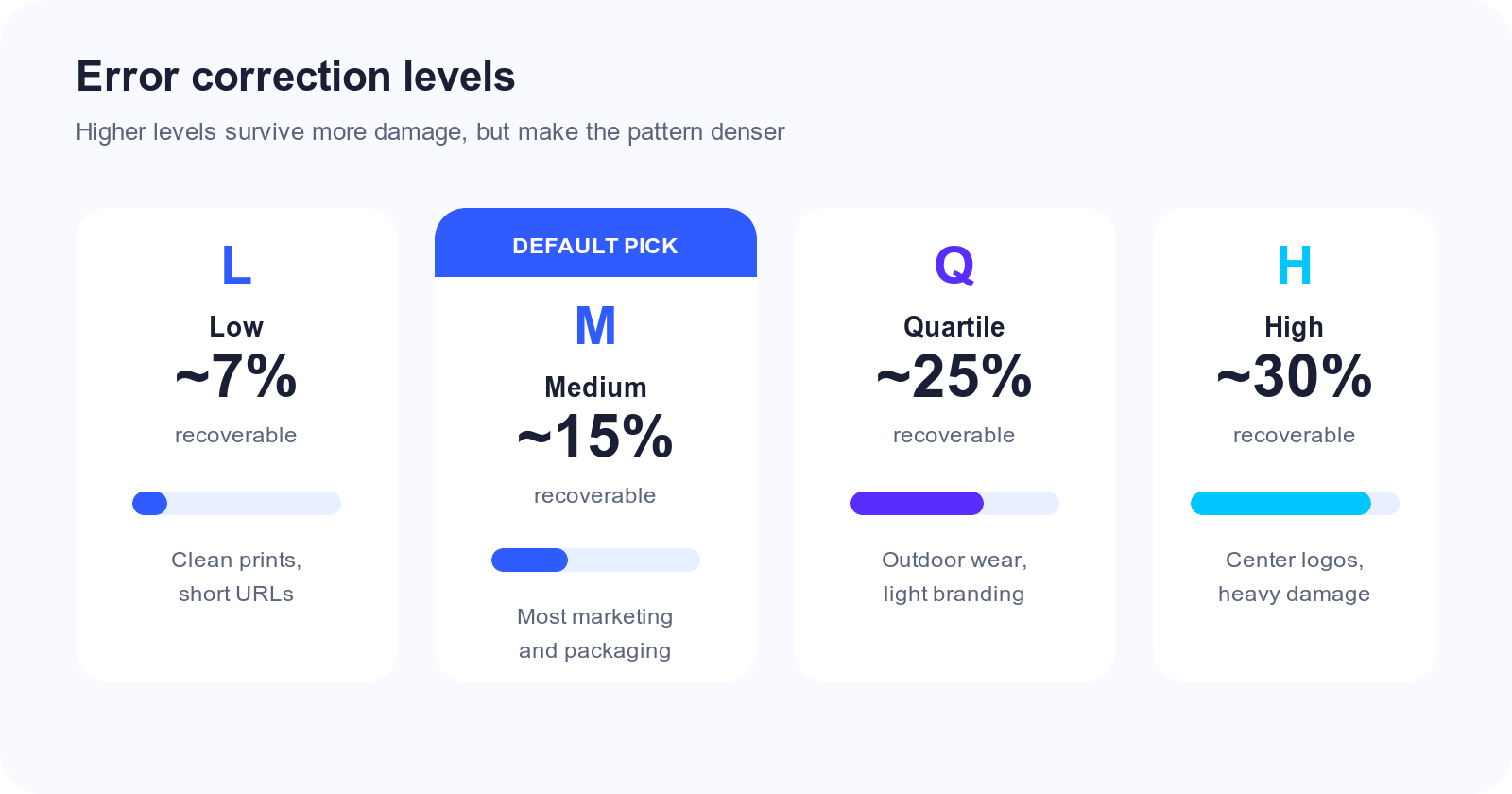
- L (Low) — recovers about 7%
- M (Medium) — about 15% (a solid default for clean print)
- Q (Quartile) — about 25%
- H (High) — about 30% (use when you place a logo or expect wear)
If you brand the center of a code, use high error correction and keep the logo well under ~20% of the area. Always test with both iPhone and Android cameras after you design.
What Happens When You Scan
- The camera detects finder patterns and estimates orientation.
- Timing and alignment patterns calibrate the grid.
- Modules are sampled into bits; error correction repairs missing pieces.
- The payload is interpreted (URL,
WIFI:…,BEGIN:VCARD,mailto:, etc.). - The OS or app launches the matching action.
Modern iOS and Android cameras do this natively—no third-party scanner required for most everyday uses. See our guide on scanning without an app.
Static vs Dynamic Codes (Why It Matters)
Static codes encode the final data directly. They never expire, need no server, and work offline after printing. Change the destination later? You must reprint.
Dynamic codes encode a short redirect URL you control. You can edit the destination and track scans after print. Snapkit’s free generator creates static codes; paid dynamic QR codes add editability and analytics.
Creating Codes That Actually Work
Use these checks before you print a batch:
- Contrast — dark modules on a light background; avoid light gray on white.
- Size — at least ~2 cm (0.8 in) for close-up scans; larger for distance. See the QR code size guide.
- Quiet zone — keep a clear margin; do not bleed design into the edge.
- Payload length — shorter data = simpler pattern = easier scans.
- Test prints — scan from the final material (matte/gloss, phone cases, outdoor light).
- Format — Snapkit exports PNG for universal print and web use. For vector workflows, see PNG vs SVG for QR codes.
Common Use Cases
- Website URLs — menus, packaging, posters, business cards
- Wi‑Fi — guest networks without spelling passwords (Wi‑Fi guide)
- vCards — tap-to-save contact details
- Events — registration, schedules, feedback forms
- Payments / crypto addresses — share destination strings carefully; verify before sending money
Quick FAQ
Do QR codes expire?
Static codes do not. Links can die if the website goes offline. Details: Do QR codes expire?.
Can I change colors?
Yes, if contrast stays high. Read colored QR code design tips.
Why won’t mine scan?
Usually size, contrast, damage, or density. Start with QR code won’t scan.
Create One Now
Ready to put this into practice? Open the free Snapkit QR generator, enter a URL or Wi‑Fi details, and download a print-ready PNG—no account required for static codes.
Ready to create your QR code?
Try Snapkit's free QR code generator - no signup required.
Generate QR Code