Survey & Google Form QR Codes on Snapkit (Google Forms / Typeform / Microsoft Forms HTTPS in the URL Tab)
Snapkit has no Forms, Survey, or Google Form tab. Encode a hosted HTTPS form URL in the URL tab: exact Google Forms / Typeform / Microsoft Forms / Tally shapes, why editor links and custom schemes are the wrong job, iPhone vs Android, and static vs Dynamic pitfalls.
Snapkit’s homepage has URL, Text, WiFi, Contact, SMS, Email, and Phone. There is no Forms tab, no Survey tab, no Google Form builder, and no Typeform connector. A “scan to fill this survey” QR is a URL QR. You paste a finished https:// responder address (Google Forms docs.google.com/forms/…/viewform or forms.gle/…, a Typeform share link, a Microsoft Forms Collect-responses link, or a Tally tally.so/r/… URL), download the PNG, and the camera opens that HTTPS link. The form product does the rest.
This page is the form-URL construction and the Snapkit wiring. It is not a rewrite of Google review QR codes (Place ID write-a-review, not a survey), calendar event QR codes (Google Calendar action=TEMPLATE / hosted .ics), QR codes for events (registration, check-in, sponsors — one paragraph on feedback), payment-link checkout, or WhatsApp wa.me. Those never teach /viewform vs /edit, forms.gle, or why a Workspace-restricted form still makes a scannable PNG. Sibling URL-tab destinations — Maps and video-meeting join — use the same tab for a different job. This page is only open-this-hosted-form.
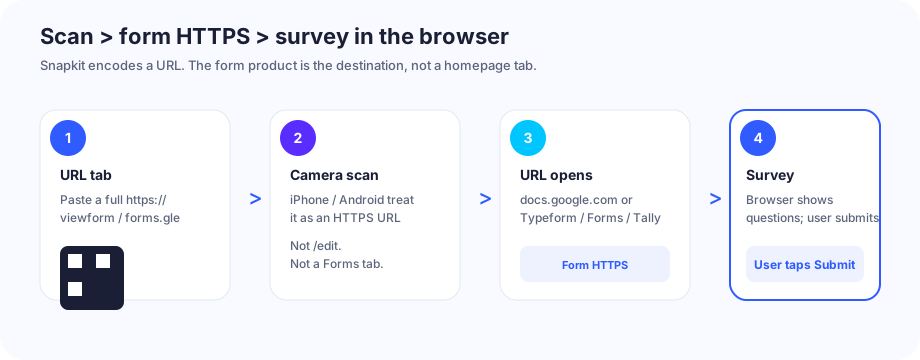
What the QR actually encodes
A survey code on this product is a website URL. The printed modules are not a Snapkit form object, a response database, a quiz grade, or a Google / Microsoft / Typeform account Snapkit assembled for you. They are the same kind of URL payload as any other URL-tab code.
On scan, the camera treats it like any other https:// link. The OS opens Safari, Chrome, or another browser. The person still answers the questions and taps Submit. That is the same honesty as Snapkit’s SMS tab: the QR starts a destination, not a completed response.
Snapkit does not collect the answers, count submissions, or tell you who filled the form. There is no Snapkit Forms inbox. Response data lives in the form product you already use.
A write-a-review URL is a different Google job. That construction lives on Google review QR codes. Do not print search.google.com/local/writereview?placeid=… and call it “feedback survey.”
Test the live responder URL in a private / logged-out window before you print. An unpublished Google Form, a closed “no longer accepting responses” form, or a tenant-only Microsoft Form still makes a scannable PNG.
Exact URL formats
Snapkit’s URL field encodes whatever you typed. There is no silent https:// prefix and no form formatter. Paste the finished URL, including the scheme. Prefer the Copy responder link / Copy link / Share control the form product already built. Do not invent a form ID from memory.
Google Forms (docs.google.com/forms/…/viewform and forms.gle)
Google’s published responder URI (the responderUri the Forms API returns, and the link Copy responder link / Preview / Share copies) is an HTTPS path under /forms/d/e/ that ends in /viewform:
https://docs.google.com/forms/d/e/1FAIpQLS…/viewform
Google’s own Send / Publish dialog can shorten that to forms.gle when you check Shorten URL and click Copy. That short host is a Google Forms share link, not a random third-party redirect:
https://forms.gle/…
Both shapes are valid if that is what the form copied for you. Include https://. Open the URL logged out. Confirm the title and that you see questions, not the editor.
Do not print the editor URL. The address bar while you build the form ends in /edit (often docs.google.com/forms/d/{id}/edit, without /e/). Scanners who are not editors hit “You need permission” / Request access. Copy responder link is the other string.
Google’s help also documents Pre-fill form (More menu → Pre-fill form → fill sample answers → Get link). That official link is still a /viewform URL plus query keys Google generated — typically usp=pp_url and entry.{number}=… pairs. Copy that link if you need a prefilled poster (event name, table number). Do not invent entry. IDs by hand. Extra usp=sf_link junk from a Send dialog is optional tracking; the form is the /viewform path.
A form that is not published (current Google Forms publish flow) cannot be opened by responders, no matter which PNG you print. Settings that force a Google sign-in — Workspace “Restrict to users in [org]”, Limit to 1 response, verified email collection, Allow response editing, or a File upload question — still open the URL; the page then asks for a Google account. That is a Forms setting, not a Snapkit bug.
Typeform (form.typeform.com/to/…)
Typeform’s help documents the default share shape: form.typeform.com/to/ plus the form ID. A workspace custom subdomain (https://yourbrand.typeform.com/to/…) is valid if Share copied it. Copy from the Share panel. Do not invent the ID.
https://form.typeform.com/to/…
Typeform documents URL parameters (formerly Hidden Fields) as a hash on that same share URL (#first_name=…&source=…), not as a Snapkit invention. If Share already appended them, paste the whole string. Do not strip the # “to clean it.” Spaces in values need %20 — Typeform’s own help says so.
https://www.typeform.com/ with no /to/ ID is the marketing site. Do not print that as “the Typeform QR.”
Microsoft Forms (forms.office.com / forms.cloud.microsoft)
Collect responses → Copy link. Microsoft’s support pages and Q&A describe the short public shape as https://forms.office.com/r/…. The same dialog can emit the longer https://forms.office.com/Pages/ResponsePage.aspx?id=… line, or a forms.cloud.microsoft host if that is what Copy link gave you after Microsoft’s domain transition. Paste the clipboard unchanged.
https://forms.office.com/r/…
https://forms.office.com/Pages/ResponsePage.aspx?id=…
Who can fill out this form still matters. “Anyone can respond” is the hallway-poster setting. “Only people in my organization” opens a Microsoft sign-in wall for everyone else. That is a Forms setting. The PNG will still decode.
Do not reconstruct unofficial r{hex}= prefill query keys from blog posts. If Microsoft’s dialog did not copy a prefilled URL, do not invent one. Prefer a clean Collect-responses link.
Tally (tally.so/r/…)
Tally’s public share / widget docs use https://tally.so/r/{FORM_ID}. Hidden fields are documented as ordinary query params on that same path (?name=Marie&ref=email). The edit URL (tally.so/forms/{id}/edit) is the builder — do not print it.
https://tally.so/r/…
Jotform, Fillout, and other hosted form share links are the same Snapkit job if you copied a full https:// responder URL. Hosts and path shapes change. There is no universal {vendor}.so/survey/{slug} we can invent here.
| You type in the URL tab | What the PNG holds | What you wanted |
|---|---|---|
Copied https://docs.google.com/forms/d/e/…/viewform | That exact string | Google Form questions |
Copied https://forms.gle/… | That exact string | Same form, Google’s short host |
Official Pre-fill Get link (/viewform?usp=pp_url&entry.…) | That exact string | Google Form with those fields filled |
Copied https://form.typeform.com/to/… (optional #params) | That exact string | Typeform |
Copied https://forms.office.com/r/… or ResponsePage.aspx?id=… or forms.cloud.microsoft/… | That exact string | Microsoft Forms |
Copied https://tally.so/r/… | That exact string | Tally |
docs.google.com/forms/…/viewform (no scheme) | Bare host | Often shown as text; one brand may guess a site |
…/edit or tally.so/forms/…/edit | Editor URL | Request access / builder, not the survey |
gform:// or another custom scheme | Custom scheme | Many iPhone Cameras show text; no web fallback |
| Bitly / random shortener you typed | That shortener | Extra hop that can expire or get parked |
https://search.google.com/local/writereview?placeid=… | Review HTTPS | Stars for a Place ID — reviews |
| Form URL pasted into Text | Characters | Words on screen, maybe a chip |
A copied share link is already encoded. Do not “clean” %20, entry., or a Typeform # fragment. Do not leave a line-break from an email body in the field; copy the single HTTPS line.
Why custom schemes and random shorteners are the wrong job
Cameras already know how to open https://. They do not reliably open a made-up gform:// or msforms:// string. The same class of failure as zoommtg:// on video-meeting and geo: on Maps: iPhone Camera often shows text.
A second hop you do not control is the other failure mode. forms.gle is Google’s own Forms shortener from the Send dialog — keep it if that is what Copy produced. A Bitly, TinyURL, or “QR generator included short link” you pasted instead of the form URL can die, get parked, or land on an interstitial. Snapkit’s URL tab does not need that wrapper. Paste the form HTTPS string (or use Snapkit Dynamic when you need a retargetable /r/ — next section).
How to copy the link (then paste into Snapkit)
Google Forms. Publish the form. Copy responder link (Preview, Published, or Share). Or Send → link icon → optional Shorten URL → Copy. Confirm the clipboard is /viewform or forms.gle, not /edit. Open it in a private window. Confirm questions appear without a Google login you did not intend.
Typeform. Share panel → Copy link. Confirm typeform.com/to/ (or your custom host) and the form title.
Microsoft Forms. Collect responses → set who can respond → Copy link. Confirm forms.office.com or forms.cloud.microsoft. Confirm “Anyone can respond” if the poster is public.
Tally. Share tab → copy https://tally.so/r/…. Confirm it is not the /forms/…/edit builder.
Then, on snapkit.store:
- Choose URL. Not Text. Not Email. There is no Forms tab.
- Paste into Website URL. Keep
https://. - Leave Make this QR Code Dynamic (Editable) unchecked unless you have a reason to retarget or to shorten a long prefilled query (next section).
- Download PNG. Do not screenshot the 256 px preview.
The generator does not rewrite form URLs and does not talk to Google, Typeform, Microsoft, or Tally.
This is not a review QR, a calendar QR, or an event-ops page
Four posters look similar. They encode different HTTPS jobs.
| Job | What you paste | What the scan should do | Guide |
|---|---|---|---|
| Fill this survey / form now | Google Forms /viewform or forms.gle, Typeform /to/, Microsoft Collect-responses, Tally /r/ | Open the questions; user taps Submit | This page |
| Write a Google review | Place ID write-a-review URL | Stars / review form for a listing | Google reviews |
| Put a session on a calendar | Google Calendar action=TEMPLATE or a hosted .ics | Open an add-event draft | Calendar event |
| Event registration / check-in / Wi‑Fi / sponsors | Ticket URL, WIFI:, sponsor page | Event ops, not one form-host construction | Events |
| Take a payment | PayPal.me / Stripe Payment Link | Checkout | Payment link |
A conference uses a feedback form. That does not make the events overview this construction guide. Paste the responder line, not a review Place ID, not BEGIN:VEVENT. If you want both posters, print two codes and label them (“Feedback survey” vs “Leave a Google review”).
URL tab vs Text vs Email vs Dynamic
Four things look like “put the survey in the code.” Only one is the Snapkit path for a hosted form.
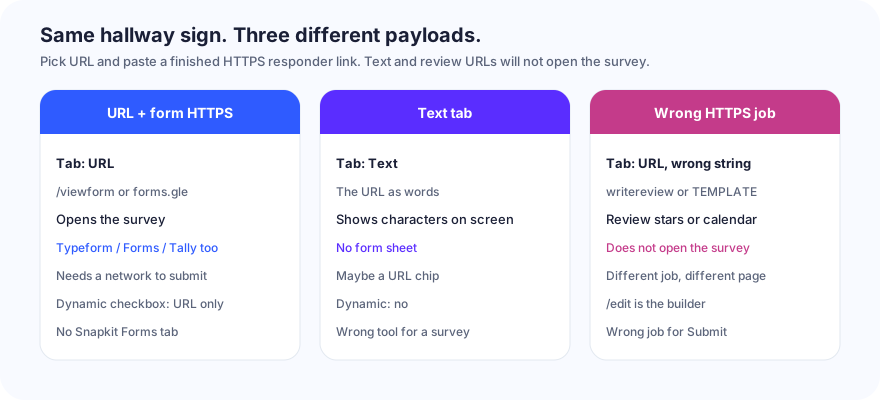
| Job | Snapkit tab | Encoded payload | Opens | Dynamic toggle? |
|---|---|---|---|---|
| Fill Google Forms / Typeform / Microsoft Forms / Tally | URL | Copied https://…/viewform, forms.gle/…, Typeform /to/, Forms Copy link, or tally.so/r/… | Browser form | Yes — URL only |
| Show the link as words | Text | Exact characters | On-screen text | No |
| Email the organizer | mailto: | Mail draft | No | |
| Write a Google review | URL (different string) | Write-a-review HTTPS | Review UI | Yes — URL only |
| Retarget the form URL after print | URL + Dynamic checked | Snapkit /r/…, then a 302 to the form HTTPS URL | Browser → Snapkit → form | That is the toggle |
Putting https://docs.google.com/forms/…/viewform in Text does not create a Forms tab Snapkit does not have. Some cameras notice a URL inside the paragraph and offer a chip. Treat that as a bonus. URL vs Text is the tab choice; this page is the destination string.
Putting the organizer’s address in Email writes mailto:. That is a mail draft, not the survey. The SMS / Email / Phone doc is that job.
Dynamic is not a fourth form format. It is a short-link wrapper around the same HTTPS destination. The homepage checkbox exists only on URL. Static generation stays in the browser. Dynamic encodes https://snapkit.store/r/…, then a 302. Details: static vs dynamic, how Snapkit generates codes, and /dynamic.
Static vs Dynamic when the form URL might change
Duplicating a Google Form, publishing “version 2,” or swapping Typeform workspaces issues a new share URL. Editing questions inside the same Google Form usually keeps the same /viewform (and the same forms.gle) address — the page content changes; the string does not. That processor-side edit is not Snapkit Dynamic.
| Static PNG | Dynamic /r/ | |
|---|---|---|
| What the modules hold | The form HTTPS URL itself | Snapkit short link |
| Permanent feedback form (same share URL) | Short /viewform or forms.gle; pattern stays loose | Also short |
Long official prefill (entry. × many fields) | Pattern densifies; may approach the 1,000 / 1,200 cap | Short /r/ stays loose |
| New form version with a new share link | Reprint | Retarget the destination |
| Works if Snapkit is unreachable | Yes | No — scan never leaves /r/ |
| Free trial expired | n/a | Lands on /expired |
| First URL the camera opens | docs.google.com, forms.gle, Typeform, or Forms | snapkit.store |
| Scan counts | No (this product does not invent pixel analytics on static files) | Yes, on a paid dynamic plan |
| Response inbox / quiz scores | Form product only | Still form product only |
Static is the default for a bathroom feedback poster, a course-eval sticker, or any form whose share URL will not move. The PNG is the form URL. If Snapkit is down, the sticker still opens Google Forms.
Dynamic is the honest choice when next quarter’s survey will be a different form ID, when you swap Typeform for Tally after print, or when the only URL you have is a dense official prefill query — and you have tested the /r/ hop on both phone brands. The print then depends on Snapkit being reachable and the dashboard still pointing at a live responder URL.
Do not share one Dynamic short link across “fill the survey” and “leave a Google review.” Retargeting the dashboard to a menu is how a lobby poster stops collecting answers.
After the scan: iPhone vs Android
The PNG holds a URL. The OS decides what happens next. Camera apps are not identical. Hosted forms are web pages. There is no Zoom-style Universal Link you should count on for Google Forms or Tally.
| Situation | Typical result | Do not assume |
|---|---|---|
https://…/viewform or forms.gle, iPhone Camera | Preview of the https:// link, then Safari | That a Google Forms app will take over |
| Same URL, iPhone, form requires Google sign-in | Safari, then an account chooser | Anonymous submit on a Workspace-restricted form |
| Same URL, Android Camera / Lens | Preview, then Chrome or the Google app | Every OEM uses the same chrome |
| Typeform / Tally HTTPS, either phone | Browser loads the form | Offline fill the way a Text QR would |
| Microsoft Forms, “people in my organization” | Browser, then Microsoft sign-in | That a hallway guest can submit |
…/edit on either phone | Request access / editor, or a login | Questions |
| Dynamic URL, destination is the form | Browser to Snapkit, 302, then the same as above | A cleaner first hop than the form host itself |
| Airplane / dead data | Camera may lock; the form still needs a network | Offline submit |
| Form closed / unpublished | Landing page refuses responses | That a scannable PNG means the form is live |
Universal Links / App Links, when they fire at all, fire on an https://docs.google.com/… or https://forms.office.com/… navigation. They do not fire on a custom scheme most cameras will not open. They do not fire on the first hop of a Dynamic /r/ code — that host is snapkit.store.
Test the downloaded PNG on one iPhone and one Android. Confirm the form title (not last semester’s quiz). Confirm Submit is still yours to tap. Confirm a phone without a Google or Microsoft session still sees what you intended — questions, or an honest sign-in wall you chose.
Print and placement (table tent, slide, receipt)
Do not reprint the size or print math here. A forms.gle or short /viewform URL is a short HTTPS payload, so the pattern stays loose if you download the ~1024 px PNG instead of screenshotting the 256 px preview (test the file). A long official prefill query is the exception — print larger, or wrap it in Dynamic.
| Placement | What matters for a form QR | Skip |
|---|---|---|
| Table tent / counter feedback | Arm’s-length scan; label “Scan to fill the survey” (name the product) | Tiny icon-sized marks next to the tip jar |
| Closing slide / hybrid-event screen | Reading distance from the seats; high contrast on a bright screen | Light-purple modules “to look like Google” |
| Receipt / bathroom poster | Static share URL that will not rotate; reprint when you close the form | One code for “survey + Google review + Wi‑Fi” |
| Course handout that outlives the quiz | Wrong object — the PNG will still decode a closed form | A one-week quiz on a semester-long syllabus |
Print the human-readable form title beside the code. Dual-SIM travelers and “my camera will not lock” people still need a path. If the camera never locks, that is size, contrast, or crop — start at QR code won’t scan, not at entry..
Event ops (registration, check-in, sponsors) stay on QR codes for events. This page is only the form URL.
Mistakes that never open the survey
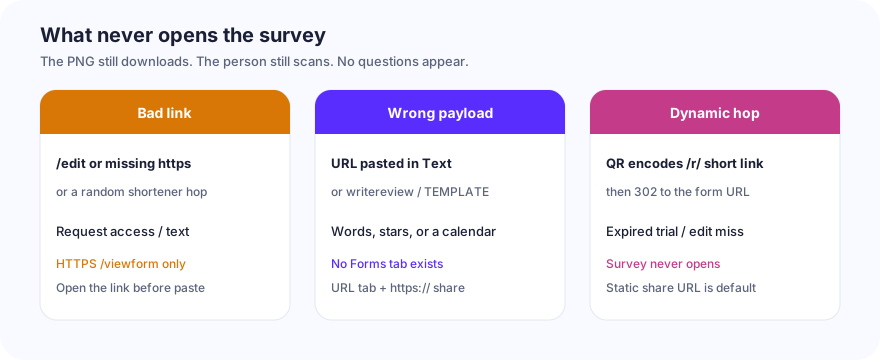
| What you did | What the scan does | Fix |
|---|---|---|
…/edit or Tally /forms/…/edit | Request access / builder | Copy responder / Share / Collect-responses link |
Form URL without https:// | Locks, then text or a one-brand open | Type the full scheme |
| Unpublished Google Form, or “not accepting responses” | Scan works; page refuses submit | Publish / turn responses on; open logged out |
| Workspace restrict, Limit to 1 response, file upload | Sign-in wall you did not label | Relax Forms settings, or say “sign in with school email” |
Invented entry. IDs (or unofficial Microsoft prefills) | Empty fields, or a broken query | Official Pre-fill Get link only |
forms.gle you typed from memory | Wrong form, or a dead short link | Copy from this form’s Shorten URL |
Truncated /e/1FAIpQLS… token | 404 / “form not found” | Copy again; open it once before paste |
| Bitly / random shortener instead of the form URL | Extra hop; can expire or park | Paste the form HTTPS string |
gform:// or another custom scheme | Many cameras show text | HTTPS share URL in the URL tab |
| Write-a-review URL labeled “survey” | Google review UI | Reviews vs this page |
action=TEMPLATE labeled “feedback” | Add-event draft | Calendar-event vs this page |
| Form URL pasted into Text | Words; maybe a chip | URL tab |
| Long official prefill past ~1,000 / 1,200 chars | Amber warning, then download blocked | Shorter Get-link, or Dynamic /r/ |
| Dynamic URL, destination is the form | PNG encodes /r/…, then a 302 | Works only while the redirect is live and still points at the form |
| Dynamic, free trial expired | Scan hits /expired | Paid plan, or a static form PNG |
| Dynamic, you later retarget to a menu | Poster opens lunch | Do not share that short link across jobs |
| Screenshot of the 256 px preview | Soft modules after print | Download PNG (~1024 px) |
Dynamic on a form destination is the subtle one. The print encodes https://snapkit.store/r/…, not docs.google.com. The phone must reach Snapkit, get a 302, then land on the form. That extra hop is why you can retarget next quarter’s survey without reprinting the tent. It is also why an expired trial, a typo in the dashboard, or Snapkit being unreachable means no questions. For a sticker you will not reprint, static https://docs.google.com/forms/…/viewform (or the copied forms.gle / Typeform / Forms / Tally share HTTPS) is the correct default.
Build list (this product)
- Open snapkit.store. Choose URL. Not Text. Not Email. There is no Forms tab.
- In Google Forms, Typeform, Microsoft Forms, or Tally, copy the responder / share HTTPS link (
/viewform,forms.gle, Typeform/to/, Collect responses, ortally.so/r/…). Not/edit. Not a review Place ID. Not a random shortener. - Open that URL in a private window. Confirm the title and that questions appear (or that the sign-in wall is the one you intended). Then paste the finished URL into Website URL. Include
https://. - Leave Dynamic unchecked unless you have a reason to retarget or to shorten a long official prefill, and you have tested the
/r/hop on both phone brands. - Download PNG. Do not screenshot the 256 px box.
- Scan the file on an iPhone and an Android. Confirm the form title. Confirm Submit is still yours to tap. Confirm a logged-out phone still has a path you can live with.
- Print the mark with a quiet zone and the form title beside it. A dead camera lock is size, contrast, or crop — start at QR code won’t scan, not at
entry..
The generator’s job is the PNG. Google Forms’ job (or Typeform / Microsoft Forms / Tally) is the survey. The URL tab is the only Snapkit control that connects the two.
Ready to create your QR code?
Try Snapkit's free QR code generator - no signup required.
Generate QR Code