Calendar Event QR Codes on Snapkit (Google Calendar Links in the URL Tab)
Snapkit has no Calendar tab. Encode a Google Calendar HTTPS template, share link, or hosted .ics URL in the URL tab: official query keys, what the PNG holds, iPhone vs Android, and Dynamic pitfalls.
Snapkit’s homepage has URL, Text, WiFi, Contact, SMS, Email, and Phone. There is no Calendar tab, no VEVENT builder, and no geo pin. A maps pin is a different URL-tab job (Google Maps location). An “add this event to my calendar” QR is a URL QR. You paste a finished https://calendar.google.com/… address (Google’s documented template, or the share / publish link Calendar already copied for you), download the PNG, and the camera opens that HTTPS link. Google Calendar does the rest.
This page is the calendar URL construction and the Snapkit wiring. It is not a rewrite of the events lifecycle guide (registration, check-in, WiFi, sponsors), the URL vs Text field map, or how Snapkit generates codes (that article only notes calendar is not a tab). Those pages never teach action=TEMPLATE or dates=.
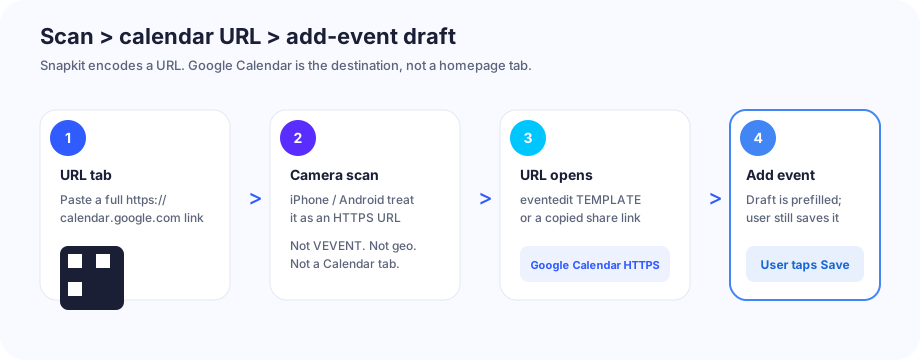
What the QR actually encodes
An add-to-calendar code on this product is a website URL. The printed modules are not a calendar account, a Snapkit event object, or an iCalendar payload Snapkit assembled for you. They are the same kind of URL payload as any other URL-tab code.
On scan, the camera treats it like any other https:// link. If the destination is Google’s event-edit template, Google Calendar opens a prefilled draft. The event is not on anyone’s calendar until that person taps Save (and is signed in). That is the same honesty as Snapkit’s SMS tab: the QR starts a draft.
If you instead encode a hosted .ics URL, the phone downloads or offers to import a file. Snapkit still only encoded the HTTPS address. We do not parse BEGIN:VEVENT.
Test the live URL in a browser before you print. A broken dates= value still makes a scannable PNG.
Exact URL formats (Google Calendar)
Google’s current Calendar API docs publish one add-yourself link shape. Use that when you are building the string by hand.
Documented template (r/eventedit). Required idea: action=TEMPLATE, a dates= start/end pair, and a text= title. Time zones go in stz and etz as IANA names. Description and venue are details and location. Encode spaces and punctuation. Encode the slash between the two instants as %2F.
https://calendar.google.com/calendar/r/eventedit?action=TEMPLATE&dates=20261015T220000Z%2F20261016T000000Z&stz=America/Los_Angeles&etz=America/Los_Angeles&details=Tour%20starts%20at%20the%20lobby&location=123%20Market%20St&text=Open%20House
That example is 3:00–5:00 p.m. on 15 October 2026 in America/Los_Angeles, expressed as UTC instants (…T220000Z / next-day T000000Z) the way Google’s own sample does.
All-day, same official dates= field, date-only, exclusive end (the day after the last day you want on the calendar):
https://calendar.google.com/calendar/r/eventedit?action=TEMPLATE&text=Community%20Cleanup&dates=20261015%2F20261016&details=Bring%20gloves
Share / publish link from the Google Calendar UI. Open the event → more menu → Publish event (wording varies) → copy the URL. The product emits a TEMPLATE link that already carries the event, typically:
https://calendar.google.com/calendar/event?action=TEMPLATE&tmeid=…&tmsrc=…
Do not invent tmeid. It is an encoded event-plus-calendar token Calendar generated. If the source calendar is not visible to guests, that link can open a blank untitled draft—the usual “I published an event on a private calendar” failure. Copy, open in an incognito window, confirm the title and times, then paste into Snapkit.
Older render entry. https://calendar.google.com/calendar/render?action=TEMPLATE&text=…&dates=… still lands on the same editor. Prefer the r/eventedit form Google documents today unless a tool you already use emits render.
View link (eid=). Calendar’s htmlLink looks like https://www.google.com/calendar/event?eid=…. That is a view of an existing event for people who already have access. It is not the documented add-yourself template. Do not print it as an “add to calendar” mark unless you have tested that a guest account can open it.
Snapkit’s URL field encodes whatever you typed. There is no silent https:// prefix and no calendar formatter. Paste the finished URL, including the scheme.
| You type in the URL tab | What the PNG holds | What you wanted |
|---|---|---|
Full r/eventedit?action=TEMPLATE&dates=…&text=… | That exact string | Prefilled Google Calendar draft |
Copied calendar/event?action=TEMPLATE&tmeid=…&tmsrc=… | That exact string | Same, using Calendar’s own share URL |
https://yoursite.example/open-house.ics | That exact string | File import / subscribe, not a Google draft |
calendar.google.com/calendar/r/eventedit?… (no scheme) | Bare host | Often shown as text; one brand may guess a site |
webcal://yoursite.example/open-house.ics | Custom scheme | Many cameras ignore it; no web fallback |
BEGIN:VEVENT pasted here | A non-URL string | Camera does not open Calendar |
Build query values with a real encoder (encodeURIComponent in a console, or any URL encoder). Do not leave raw spaces, &, or # in text, details, or location. Those split or truncate the payload inside the QR.
dates= rules that actually break the draft
Google’s sample uses compact ISO 8601: YYYYMMDDTHHMMSSZ for a UTC instant, two values joined by / (write %2F in the query). Both ends are required for a timed event.
| You wrote | What Google typically does | Fix |
|---|---|---|
dates=2026-10-15T15:00:00/2026-10-15T17:00:00 | Hyphens and colons; draft times vanish or ignore the pair | Compact: 20261015T220000Z%2F20261016T000000Z |
dates=20261015T150000Z (no end) | Incomplete pair | Always start%2Fend |
start=20261015T150000Z or date= | Keys Google’s template does not document | dates= only |
dates=20261015/20261015 for all-day | Exclusive end collapses the day | End = next calendar day |
Local wall time plus a leftover Z | Hour shifts by the UTC offset | Either real UTC + Z, or omit Z and set stz / etz |
ctz=… instead of stz / etz | Unofficial; do not rely on it | Use the IANA names Google documents |
stz and etz are IANA Time Zone Database names (America/Los_Angeles, Europe/Brussels). They are not offsets like UTC-7.
Hosted .ics (when Google is not the audience)
A public https:// URL that serves a .ics file is still a URL QR. iPhone Safari often offers Add to Calendar. Android may download the file or hand it to Google Calendar. You host the bytes; Snapkit only encodes the address.
Use this when the room is mixed Apple Calendar / Outlook / Google, or when you do not want to force a Google sign-in. Keep the file small (one VEVENT, or a short calendar). A 200-event feed densifies nothing in the QR—the QR is still short—but the import is a different product.
Do not encode webcal://. It is the same class of mistake as whatsapp:// on the WhatsApp guide: many camera apps will not open a custom scheme. Publish https://, and let the OS map the file type.
A Google Calendar public iCal URL (…/calendar/ical/…/public/basic.ics) is a subscribe-to-this-calendar feed, not a one-shot add of a single session. That is fine for a season schedule. It is the wrong object for “put this open house on my calendar.”
Apple documents calendar subscription from a web address (Calendar on Mac: File → New Calendar Subscription). Apple does not publish a Google-style eventedit query string. Microsoft’s Outlook.com compose URLs exist in the product, but Microsoft does not ship a stable public parameter spec. If Outlook is the audience, copy an add/share link from Outlook itself after you have opened it in a private window—or host .ics on HTTPS. Do not invent startdt= / rru= keys here.
URL tab vs Text (and why VEVENT does not help)
Three things look like “put the event in the code.” Only one is the Snapkit path.
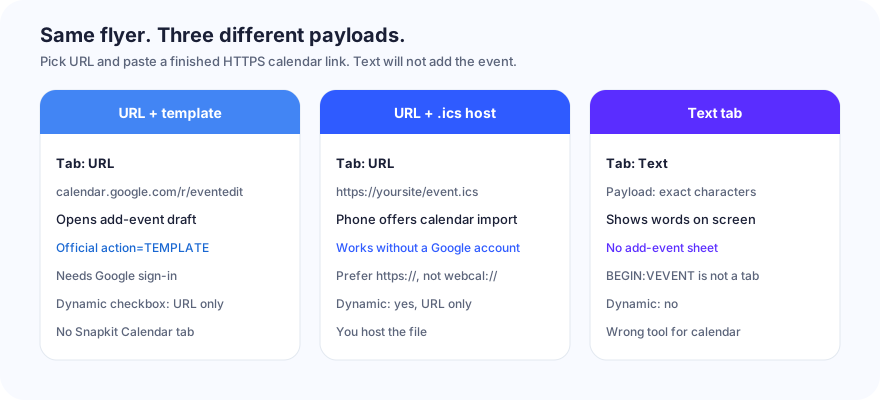
| Job | Snapkit tab | Encoded payload | Opens | Dynamic toggle? |
|---|---|---|---|---|
| Add to Google Calendar | URL | https://calendar.google.com/calendar/r/eventedit?action=TEMPLATE&… or a copied TEMPLATE share link | Google Calendar draft | Yes — URL only |
| Import a file / mixed calendar apps | URL | https://…/event.ics | Browser + OS import sheet | Yes — URL only |
| Show the date as words | Text | Exact characters | On-screen text | No |
Putting BEGIN:VEVENT in Text does not create a Calendar tab Snapkit does not have. Some third-party scanner apps notice iCalendar text and offer an import. iPhone Camera and stock Android Camera usually show a block of text. URL vs Text is the tab choice; this page is the destination string.
Putting the registration form in the URL tab is a valid event ops code. It is not an add-to-calendar code. That job lives on QR codes for events.
Static vs Dynamic for calendar destinations
The homepage checkbox Make this QR Code Dynamic (Editable) exists only on URL. Static generation stays in the browser. Dynamic encodes https://snapkit.store/r/…, then a 302. Details: static vs dynamic and how Snapkit generates codes.
| Static PNG | Dynamic /r/ | |
|---|---|---|
| What the modules hold | The calendar HTTPS URL itself | Snapkit short link |
Long eventedit query | Pattern densifies; print larger | Short /r/ stays loose |
| Change the time after print | Reprint | Retarget the destination |
| Works if Snapkit is unreachable | Yes | No — scan never leaves /r/ |
| Free trial expired | n/a | Lands on /expired |
| First URL the camera opens | calendar.google.com or your .ics host | snapkit.store |
| Scan counts | No (this product does not invent pixel analytics on static files) | Yes, on a paid dynamic plan |
A hand-built template URL is long. That is the one honest reason Dynamic is tempting: fewer modules. The cost is the extra hop. App handoff into Google Calendar is more reliable when the first URL is already calendar.google.com. For a poster you will not reprint, static + a copied (shorter) publish link, or static + a short https://yoursite/event.ics, is the boring default.
Do not share one Dynamic short link across “add to calendar” and “buy tickets.” Retargeting the dashboard to a menu or a registration form is how a lobby sign stops adding the event.
After the scan: iPhone vs Android
The PNG holds a URL. The OS decides what happens next. Camera apps are not identical.
| Situation | Typical result | Do not assume |
|---|---|---|
| Google TEMPLATE URL, iPhone Camera | Preview of the https://calendar.google.com/… link, then Safari (sign-in) or the Google Calendar app if it claims the host | That Apple Calendar opens and saves with one tap |
| Google TEMPLATE URL, Android Camera / Lens | Preview, then Chrome or the Google Calendar app compose sheet | Every OEM uses the same chrome |
| Guest is not signed into Google | Sign-in wall, then the draft | That a calendar event appears with no account |
Hosted https://… .ics, iPhone | Safari download / Add to Calendar | That Google Calendar is involved |
Hosted .ics, Android | Download or Google Calendar import | A silent save with no prompt |
webcal:// in the QR | Many cameras show nothing useful | A Magical Apple-only fallback |
| Dynamic URL, destination is Calendar | Browser to Snapkit, 302, then the same as above | Handoff as clean as a first-party Calendar URL |
| Airplane / dead data | Camera may lock; opening Calendar still needs a network | Offline import the way a Text QR would |
Universal Links / App Links fire on an https://calendar.google.com/… navigation when the Google Calendar app is installed. They do not fire on a webcal:// string, and they do not fire on raw BEGIN:VEVENT text.
Test the downloaded PNG on one iPhone and one Android. Confirm the draft title, start, and end (timezone included). Confirm Save is still required. Confirm the no-account path is a sign-in you can live with, not a dead custom scheme.
Mistakes that break “add event”
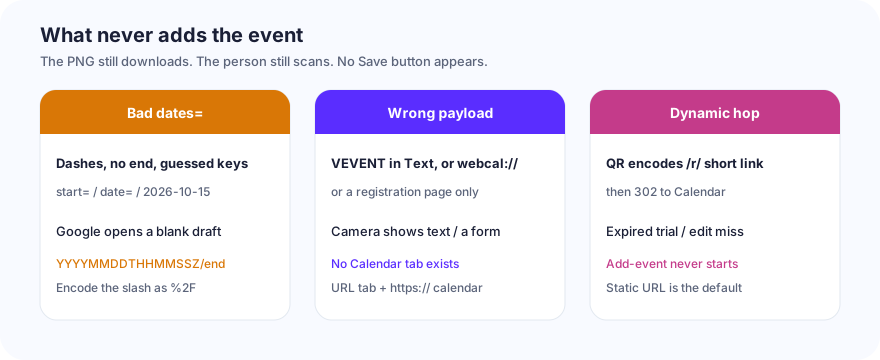
| What you did | What the scan does | Fix |
|---|---|---|
dates= with hyphens/colons, or a missing end | Draft opens untitled or at the wrong hour | Compact ISO pair, %2F between instants |
Guessed keys (start=, date=, title=) | Google ignores them | text, dates, stz, etz, details, location |
| All-day end equal to start | Zero-length day | Exclusive end = next date |
Local clock + leftover Z | Event lands in the wrong zone | UTC + Z, or no Z plus stz/etz |
Calendar URL without https:// | Locks, then text or a one-brand open | Type the full scheme in the URL tab |
webcal:// or BEGIN:VEVENT in Text | Words, or a camera that does nothing | URL tab, https:// calendar or .ics |
https://calendar… pasted into Text | Words on screen; maybe a chip | URL tab |
Printed an eid= view link | Guest sees “no access” or a sign-in loop | TEMPLATE URL, or a public publish link you tested logged out |
Private-calendar publish tmeid | Blank untitled event | Publish from a calendar guests can read, or build eventedit by hand |
| Encoded the registration page | Form opens; nothing is saved to Calendar | Different job — see events |
| Dynamic URL, destination is Calendar | PNG encodes /r/…, then a 302 | Works only while the redirect is live and still points at Calendar |
| Dynamic, free trial expired | Scan hits /expired | Paid plan, or a static calendar PNG |
| Dynamic, you later retarget to a menu | Lobby poster opens lunch | Do not share that short link across jobs |
| Screenshot of the 256 px preview | Soft modules after print | Download PNG (~1024 px) |
Dynamic on a calendar destination is the subtle one. The print encodes https://snapkit.store/r/…, not calendar.google.com. The phone must reach Snapkit, get a 302, then land on the template. That extra hop is why you can retarget a slipped start time without reprinting. It is also why an expired trial, a typo in the dashboard, or Snapkit being unreachable means no add-event. For a sticker you will not reprint, static https://calendar.google.com/… (or a short hosted .ics) is the correct default.
Build list (this product)
- Open snapkit.store. Choose URL. Not Text. Not Contact. There is no Calendar tab.
- Build or copy the address. Prefer Google’s
r/eventedit?action=TEMPLATEwithdates=+text=(optionalstz,etz,details,location), or paste the Publish / share TEMPLATE link Calendar already made. Or host one.icsonhttps://and copy that. - Open that URL in a browser. Confirm the draft title and times. Then paste the finished URL into Website URL. Include
https://. - Leave Dynamic unchecked unless you have a reason to retarget or to shorten a long query, and you have tested the
/r/hop on both phone brands. - Download PNG. Do not screenshot the 256 px box.
- Scan the file on an iPhone and an Android. Confirm Save / Add is still yours to tap. Confirm a signed-out guest sees a path you accept.
- Print the mark with a quiet zone and the human-readable date beside it. A dead camera lock is size, contrast, or crop — start at QR code won’t scan, not at
dates=.
The generator’s job is the PNG. Google Calendar’s job (or the phone’s ICS importer) is the draft. The URL tab is the only Snapkit control that connects the two.
Ready to create your QR code?
Try Snapkit's free QR code generator - no signup required.
Generate QR Code