WhatsApp Click-to-Chat QR Codes (wa.me Links)
Snapkit has no WhatsApp tab. Encode a wa.me URL in the URL tab: E.164 number rules, ?text= prefills, when to use SMS or Phone instead, and mistakes that never open a chat.
Snapkit’s homepage has URL, Text, WiFi, Contact, SMS, Email, and Phone. There is no WhatsApp tab. A click-to-chat QR is a URL QR. You type a https://wa.me/… address (or the longer https://api.whatsapp.com/send?… form), download the PNG, and the camera opens that HTTPS link. WhatsApp does the rest.
This page is the wa.me construction and the Snapkit wiring. It is not a rewrite of the SMS / Email / Phone field map, the Instagram bio guide, or the small-business overview. Those never teach country-code digits or prefilled ?text=.
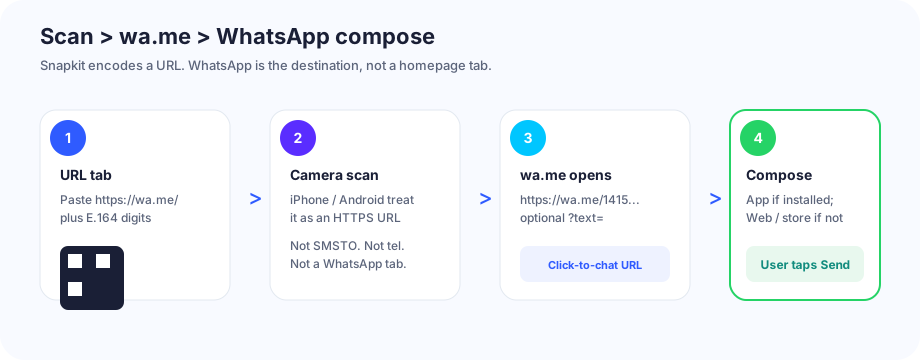
What the QR actually encodes
A WhatsApp click-to-chat code is a website URL. Meta’s documented format is https://wa.me/ plus the destination number. The printed modules are not a WhatsApp account, a Business catalog, or a Snapkit chat product. They are the same kind of URL payload as any other URL-tab code.
On scan, the camera treats it like any other https:// link. If WhatsApp is installed, the OS usually hands that link to the app and a compose thread appears. The message is not sent until the person taps Send. That is the same honesty as Snapkit’s SMS tab: the QR starts a draft.
If the number is not registered on WhatsApp, the app typically says so after it opens. Snapkit cannot preflight that. Test the live wa.me URL in a browser before you print.
Exact URL formats
Chat with a number (what you want on a counter sticker):
https://wa.me/14155550100
Same chat, prefilled compose text. WhatsApp’s docs use ?text= with a URL-encoded string. Spaces become %20. The person can still edit or delete the draft.
https://wa.me/14155550100?text=Hi%20-%20I%20scanned%20the%20counter%20code
Number omitted, text only (https://wa.me/?text=…) opens a compose box and asks who to send to. Do not print that on a store sign. You want one destination.
Older equivalent. https://api.whatsapp.com/send?phone=14155550100&text=… still opens a chat on current clients. Same digits, query phone= instead of a path. It is longer, so the QR is denser. Prefer wa.me unless a tool you already use emits the api.whatsapp.com form.
Snapkit’s URL field encodes whatever you typed. There is no silent https:// prefix and no WhatsApp formatter. Paste the finished URL, including the scheme.
| You type in the URL tab | What the PNG holds | What you wanted |
|---|---|---|
https://wa.me/14155550100 | That exact string | Chat with +1 415 555 0100 |
https://wa.me/14155550100?text=Hi%20there | Encoded prefill | Compose opens with “Hi there” |
wa.me/14155550100 (no scheme) | Bare host | Often shown as text; one brand may guess a site |
https://wa.me/+1 415 555 0100 | Plus, spaces | WhatsApp’s documented “don’t” — resolve fails |
whatsapp://send?phone=14155550100 | Custom scheme | Many cameras ignore it; no web fallback |
Build the ?text= value with a real encoder (encodeURIComponent in a console, or any URL encoder). Do not leave raw spaces, &, or # in the query. Those split or truncate the payload inside the QR.
Country code / E.164 (the usual break)
WhatsApp’s click-to-chat help is specific: full international format, omit +, brackets, dashes, and the trunk zero. Digits only. Country code first. That is E.164 without the plus.
Worked examples (fictional numbers):
| How people write it locally | Country code | Digits for wa.me | URL |
|---|---|---|---|
(415) 555-0100 | 1 (US) | 14155550100 | https://wa.me/14155550100 |
07700 900123 | 44 (UK) | 447700900123 | https://wa.me/447700900123 |
0151 12345678 | 49 (DE) | 4915112345678 | https://wa.me/4915112345678 |
0812 3456 7890 | 62 (ID) | 6281234567890 | https://wa.me/6281234567890 |
The UK / DE / ID rows drop the leading 0 after you add the country code. https://wa.me/4407700… and https://wa.me/620812… are the classic “scan works, chat does not” prints.
Do not put + in the path. Do not keep spaces “for readability” inside the URL tab. You can print the human-readable +44 7700 900123 next to the mark. The encoded string stays digits.
URL → WhatsApp vs SMS vs Phone
Three homepage tabs look like “contact us.” They open three apps.
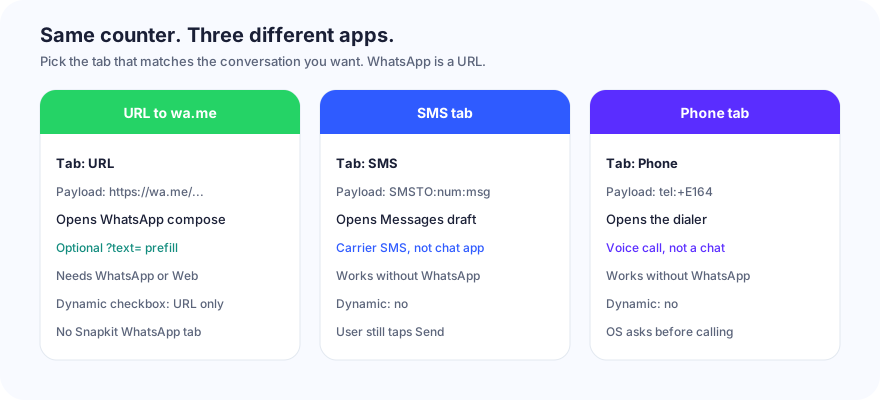
| Job | Snapkit tab | Encoded payload | Opens | Needs WhatsApp? | Dynamic toggle? |
|---|---|---|---|---|---|
| WhatsApp chat | URL | https://wa.me/{digits} optional ?text= | WhatsApp compose (or Web / store) | Yes, for the app | Yes — URL only |
| Carrier text | SMS | SMSTO:{phone}:{message} | Messages draft | No | No |
| Voice call | Phone | tel:{phone} | Dialer | No | No |
Use SMS when the audience may not have WhatsApp, or when you want a keyword (JOIN DOWNTOWN) in the stock Messages app. Use Phone when you want a ring, not a thread. Use URL + wa.me when the conversation you want is WhatsApp.
Putting a phone number in the Phone tab does not create a WhatsApp code. The SMS / Email / Phone doc is explicit: that tab does not add WhatsApp links. Putting https://wa.me/… in Text shows the URL as words. URL vs Text is the tab choice; this page is the destination string.
Personal vs WhatsApp Business
wa.me does not care which WhatsApp product owns the number. A personal account and a WhatsApp Business app account both accept click-to-chat if the number is registered. Snapkit does not provision Business, catalogs, labels, or Cloud API. Those live in WhatsApp.
Practical split:
- Personal number on a public sticker — every scan can ring that phone at 2 a.m. The QR is public. Anyone who photographs it can decode the digits.
- WhatsApp Business app — same
wa.meURL. Away messages, a greeting, and a catalog are WhatsApp settings, not Snapkit fields. They still apply when the compose window opens. - WhatsApp Business Platform (Cloud API) — also a phone number you can put after
wa.me/. The API, message templates, and opt-in rules are Meta’s. This generator does not talk to that API.
Switching the destination from a personal line to a Business line is a new URL. A static PNG will not follow you. Reprint, or use Dynamic on the URL tab and retarget the short link (read the pitfalls below before you do that on a sticker run).
Print and placement (store, flyer, sticker)
Do not reprint the size or print math here. A wa.me URL is a short HTTPS payload, so the pattern stays loose if you download the ~1024 px PNG instead of screenshotting the 256 px preview (test the file).
| Placement | What matters for WhatsApp | Skip |
|---|---|---|
| Store counter tent | Arm’s-length scan; label “WhatsApp us”; dark on light | Tiny icon-sized marks next to the card reader |
| Flyer / handbill | Size for the real reading distance; quiet zone on busy art | Encoding a paragraph of ?text= so the code densifies |
| Window / door sticker | Contrast through glass; matte if the laminate glare kills lock | Light green modules on white “to look like WhatsApp” |
| Business card | Short wa.me without a novel prefill; fallback digits in ink | whatsapp:// to “save modules” |
Print the human-readable number beside the code. Dual-SIM and “I don’t have WhatsApp” people still need a path. If the camera never locks, that is size, contrast, or crop — start at QR code won’t scan, not at the country code.
After the scan: iPhone vs Android, app vs not
The PNG holds a URL. The OS decides what happens next. WhatsApp documents click-to-chat as working on phone and WhatsApp Web. Camera apps are not identical.
| Situation | Typical result | Do not assume |
|---|---|---|
| WhatsApp installed, iPhone Camera | Preview of the https://wa.me/… link, then handoff into WhatsApp compose | That Camera will skip Safari every time |
| WhatsApp installed, Android Camera / Lens | Preview, then Chrome or the OEM browser, then the app via the same HTTPS link | Every OEM uses the same chrome |
| WhatsApp not installed | Browser loads WhatsApp’s click-to-chat page; install (App Store / Play) or WhatsApp Web | That a chat starts in an app that is not there |
| Desktop / iPad without the app | WhatsApp Web if a session exists; otherwise a download / Web prompt | A phone-only print will never be opened on a laptop |
| Airplane / dead data | Camera may lock; opening wa.me still needs a network | Offline compose the way a Text QR would |
Universal Links / App Links are how installed WhatsApp claims wa.me. They fire on an https://wa.me/… navigation. They do not fire on a whatsapp:// string most camera apps will not open anyway.
Test the downloaded PNG on one iPhone and one Android, with WhatsApp installed, then once on a phone that does not have it. Confirm compose (and that Send is still required). Confirm the no-app path is a page you can live with, not a dead custom scheme.
Mistakes that break chats
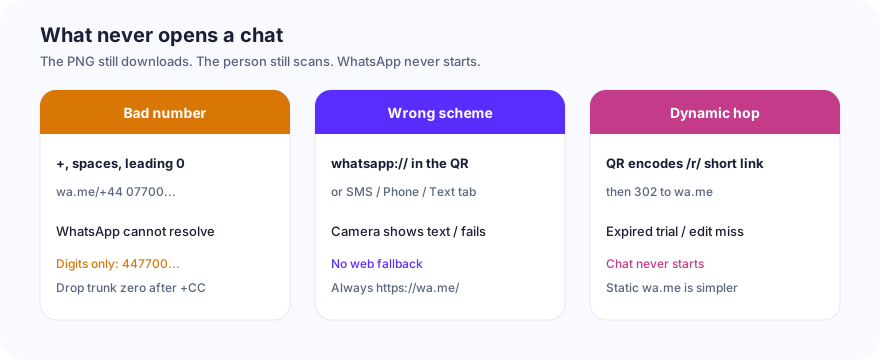
| What you did | What the scan does | Fix |
|---|---|---|
Trunk zero left in (4407700…, 620812…) | Opens WhatsApp; number not found / wrong account | Drop the leading 0 after the country code |
+, spaces, or dashes in the path | WhatsApp’s documented invalid form | Digits only |
wa.me/… without https:// | Locks, then text or a one-brand open | Type the full scheme in the URL tab |
whatsapp://send?phone=… | Many cameras show nothing useful; no Web fallback | https://wa.me/{digits} |
| Number in Phone or SMS | Dialer or Messages — not WhatsApp | URL tab, wa.me URL |
https://wa.me/… pasted into Text | Words on screen; maybe a chip | URL tab |
Raw spaces in ?text= | Query splits; prefill missing or URL looks broken | URL-encode the message |
| Dynamic URL, destination is wa.me | PNG encodes Snapkit /r/…, then a 302 | Works only while the redirect is live and still points at wa.me |
| Dynamic, free trial expired | Scan hits /expired | Paid plan, or a static wa.me PNG |
| Dynamic, you later retarget to a menu | Counter sticker opens lunch, not chat | Do not share that short link across jobs |
| Number not on WhatsApp | App opens, then “not on WhatsApp” | Register the line; test the URL first |
| Screenshot of the 256 px preview | Soft modules after print | Download PNG (~1024 px) |
Dynamic on a wa.me destination is the subtle one. The homepage checkbox Make this QR Code Dynamic (Editable) exists only on URL. The print then encodes https://snapkit.store/r/…, not wa.me. The phone must reach Snapkit, get a 302, then land on WhatsApp. That extra hop is why you get analytics and retargeting. It is also why an expired trial, a typo in the dashboard, or Snapkit being unreachable means no chat. iOS/Android app-handoff is also more reliable when the first URL the camera opens is already wa.me. For a sticker you will not reprint, static https://wa.me/{digits} is the boring, correct default. Details: static vs dynamic and how Snapkit generates codes.
Build list (this product)
- Open snapkit.store. Choose URL. Not SMS. Not Phone. Not Text.
- Build the address:
https://wa.me/+ country code + local number, digits only. Optional?text=with an encoded greeting. - Paste the finished URL into Website URL. Include
https://. - Leave Dynamic unchecked unless you have a reason to retarget and you have tested the
/r/hop on both phone brands. - Download PNG. Do not screenshot the 256 px box.
- Open the same URL in a browser. Confirm WhatsApp compose (and that Send is still yours to tap). Then scan the file on an iPhone and an Android.
- Print the mark with a quiet zone and the readable number beside it. Staff the line you encoded.
The generator’s job is the PNG. WhatsApp’s job is the thread. The URL tab is the only Snapkit control that connects the two.
Ready to create your QR code?
Try Snapkit's free QR code generator - no signup required.
Generate QR Code