SMS, Email, and Phone QR Codes in Snapkit
How the SMS, Email, and Phone tabs on snapkit.store encode SMSTO, mailto, and tel—what fields exist, what never sends, and how iPhone vs Android open the draft.
Three homepage tabs look like “contact us” and do three different jobs. Phone fills the dialer. SMS fills Messages. Email fills a mail draft. None of them transmit anything by themselves. If you pick the wrong tab, the scan “works” and the person still does the wrong action.
This is the Snapkit implementation, not a catalog of every URI scheme on the internet.
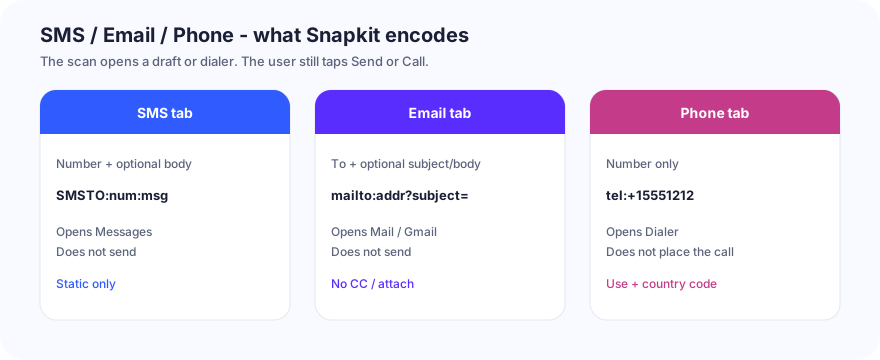
Side-by-side
| Tab | Form fields | Payload | Opens | Sends / calls? | Dynamic toggle? |
|---|---|---|---|---|---|
| SMS | Number, optional message | SMSTO:{phone}:{message} | Messaging app | No — user taps Send | No |
| Address, optional subject, optional body | mailto:{email}?subject=&body= (params omitted if empty) | Mail / Gmail / Outlook | No — user taps Send | No | |
| Phone | Number | tel:{phone} | Dialer | No — user confirms the call | No |
The dynamic checkbox on the homepage is for URL destinations only. You cannot remotely change a printed tel: or SMSTO: later. Local generation: how Snapkit generates codes.
SMS tab
Type a number. Optionally type a body. Snapkit concatenates SMSTO: + number + : + message.
Use it for a keyword (JOIN DOWNTOWN), a table number, “on site.” Do not paste a brochure into the body. Long strings make a dense QR; Snapkit warns near 1,000 characters and gets unreliable past about 1,200 for the whole payload.
iPhone: Camera preview, then Messages with a thread to that number. Existing threads may append.
Android: Stock Messages, Samsung Messages, and Google Messages disagree on rare sms: variants. Snapkit uses SMSTO:, which is the usual working form. If one OEM camera shows the raw string, try the built-in Camera / Lens path before assuming the PNG is bad.
Print the human-readable number next to the code. Dual-SIM phones may pick the wrong SIM; a QR cannot fix that.
Marketing texts have consent rules. A scan is not automatically legal opt-in. That is your compliance problem, not a Snapkit setting.
Email tab
Fields: address (the useful one), subject, body. Subject and body are passed through the browser’s URLSearchParams, so you type normal spaces—you do not hand-write %20.
Not in the form: CC, BCC, attachments. mailto: cannot attach a photo of the broken latch. If you need a file, use a URL to a form.
iPhone: Opens Mail (or the default mail app). Users with no mail account see a setup wizard. That is iOS, not a failed QR.
Android: Gmail vs Samsung Email vs Outlook-for-work. The first scan may ask which app owns mailto:.
Common self-owns
- Putting
[email protected]in the URL tab (https://hello@…) → browser error. Use Email. - Pasting an already-encoded subject so the draft shows
%20. - A body so long the client truncates it.
The address on the print is public. Anyone with a decoder reads To / Subject / Body.
Phone tab
One field. Encoded as tel: plus your digits. Include + and country code if travelers will scan it.
Snapkit does not add ext=, WhatsApp links, or FaceTime. If you type “Call us 555-…” the extra words become part of the number and the dialer looks possessed. For a click-to-chat code, use the URL tab with a wa.me address—see WhatsApp click-to-chat QR codes.
The OS still asks before placing the call.
iPhone vs Android in one pass
| Check | iPhone | Android |
|---|---|---|
| SMS draft appears | Usually Camera → Messages | Camera or Lens; app picker possible |
| Email draft appears | Mail / default | Gmail / OEM / Outlook |
| Phone | Dialer with confirm | Dialer with confirm |
| No SIM / airplane | Draft or dialer still opens; send/call fails | Same |
| Wrong tab (Text) | Shows +1555… as text | Same — no tap-to-call |
If the camera never locks, that is print/contrast, not SMSTO. Use QR code won’t scan and test the PNG.
What to print beside the code
- SMS: “Text us — scan, then tap Send.”
- Email: “Opens a draft — tap Send.”
- Phone: hours, because a 2 a.m. ring trains people not to scan you again.
Staff the number or mailbox you encoded. Snapkit will happily generate tel: for a line nobody answers.
Build list
- Homepage → SMS, Email, or Phone.
- E.164 numbers. Real inbox. Short SMS body.
- Download PNG (not a screenshot).
- Scan on one iPhone and one Android. Complete Send or Call once to yourself.
- Print the fallback digits in ink.
These three tabs are honest: they start a conversation on the scanner’s phone. They are the wrong tabs for menus, Wi‑Fi, and vCards—those are URL, Wi‑Fi, and Contact.
Ready to create your QR code?
Try Snapkit's free QR code generator - no signup required.
Generate QR Code