One QR Code for iOS and Android App Downloads
Create one QR code that sends iPhone users to the App Store and Android users to Google Play. Landing-page setup, device testing, and mistakes that waste a print run.
The Problem One Store URL Cannot Solve
You have an iOS app and an Android app. You want one printed square on a poster, a product box, or a trade-show badge. People scan it and… download the app.
That sentence hides a hard constraint: a QR code holds one payload. It cannot contain both an App Store URL and a Play Store URL. If you encode Apple’s link, Android users land in the wrong store—or nowhere. If you encode Google’s link, iPhone users hit the same wall.
This is not a Snapkit limitation. It is how QR codes work. The code is just a string. The phone’s camera opens that string. Everything after that is your job.
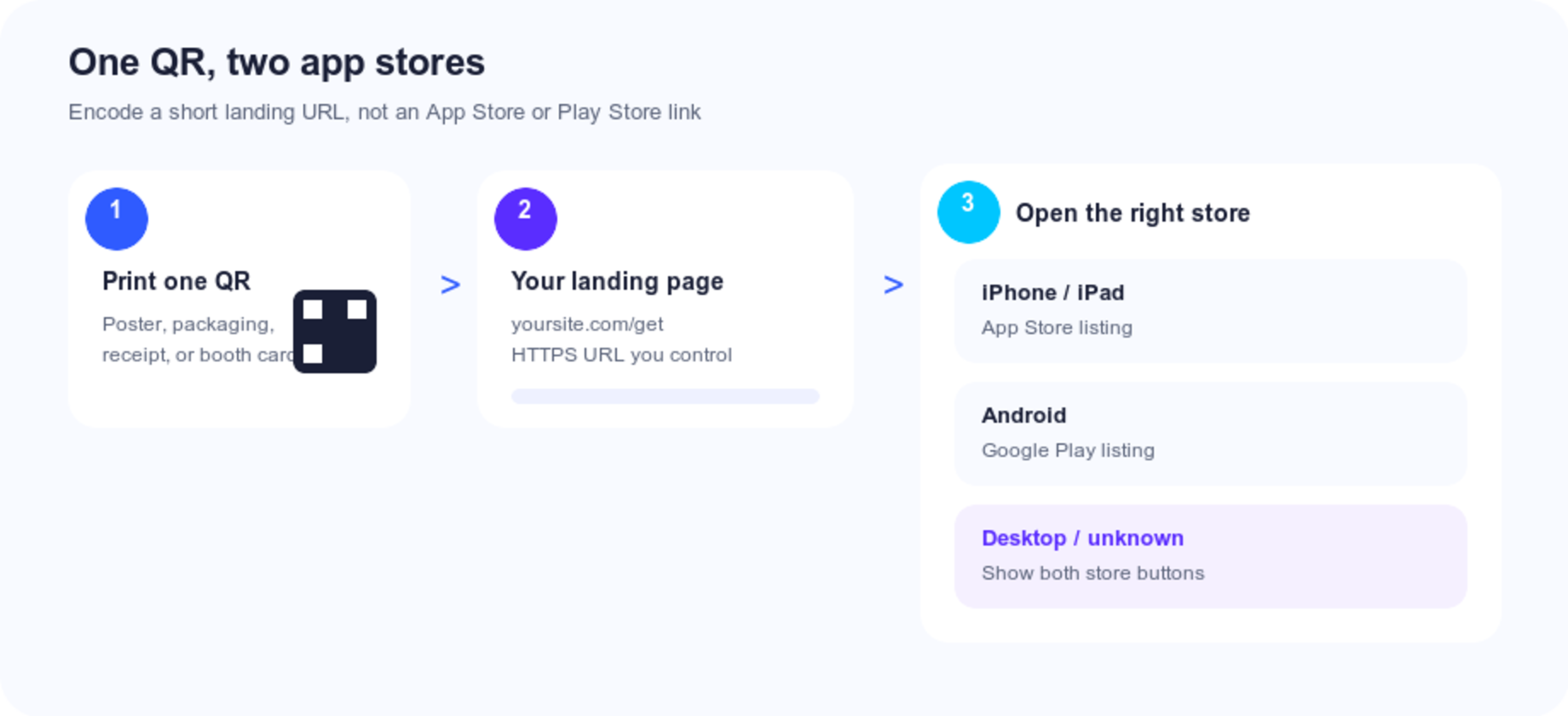
The fix is the same pattern that already works for Instagram vs a link-in-bio page: a QR code for app download should encode one HTTPS URL you control, then send each device to the right store from that page.
What the QR Code Should Encode (And What It Should Not)
This is the decision that makes or breaks the print run.
| Destination encoded in the QR | iPhone | Android | Desktop | Verdict |
|---|---|---|---|---|
App Store URL (apps.apple.com/app/id…) | Store listing | Confused / dead end | Browser listing | Wrong if you ship Android |
Play Store URL (play.google.com/store/apps/details?id=…) | Confused / dead end | Store listing | Browser listing | Wrong if you ship iOS |
itms-apps:// or market:// | Fragile | Fragile | Breaks | Never print these |
Custom app scheme (myapp://) | Opens app if installed | Same | Breaks | Wrong for download posters |
Your landing page (yoursite.com/get) | You choose | You choose | Both buttons | Default |
Encode the landing page. Keep store URLs, Universal Links, and deferred-deep-link vendors behind that page—not inside the QR pattern.
A static QR code is enough when yoursite.com/get will still exist next year. That matches how static codes avoid expiry surprises on packaging.
Get the Real Store URLs First
Do not QR-code a Google search for your app name. Search results can show competitors, old SKUs, or the wrong country storefront—the same class of mistake as linking a Google review QR to a search page instead of the write-a-review form.
App Store
- Open App Store Connect → your app → App Information.
- Copy the Apple ID (numeric).
- Use a country-agnostic listing URL:
https://apps.apple.com/app/idYOUR_APPLE_ID
Apple can localize the storefront from the visitor’s account. Avoid baking /us/ into a poster you will ship worldwide unless you only sell in one country.
Google Play
- Open Play Console → the production listing.
- Copy the application ID (
com.yourcompany.app). - Use:
https://play.google.com/store/apps/details?id=com.yourcompany.app
Open both URLs on a phone and a laptop before you generate anything. Confirm the name, icon, and developer match what you think you are promoting.
If you only have one platform today, encode that store URL—or still use a landing page that says “Android coming soon” with an email field. Printing “Download on the App Store” and then adding Android six months later is why people reprint.
Build a Landing Page That Survives Real Devices
You need a public HTTPS page. A Google Site, a Webflow page, or a 30-line HTML file on your domain all work. The page has one job: get the person into the correct store with as few taps as possible, without trapping anyone who is not on that OS.
Always render both store buttons
Put official-style App Store and Google Play links in the HTML. No JavaScript required for the page to be usable. Screen readers, in-app browsers, and people who landed on a desktop all get a path.
Add a one-line caption on the print piece so the scan is not a mystery: “Scan to download the app (iOS & Android).”
Optional: detect, then redirect—with an escape hatch
Detection is a hint, not a contract. User-Agent strings lie.
- iPadOS often reports itself as Macintosh.
- Instagram, TikTok, and Facebook in-app browsers mangle the UA and block store handoff.
- Some Android phones (Huawei and others, depending on region) have no Play Store.
If you redirect, keep the buttons visible for a beat, then send phones onward. Desktop and unknown devices should stay on the page.
<!DOCTYPE html>
<html lang="en">
<head>
  <meta charset="utf-8">
  <meta name="viewport" content="width=device-width, initial-scale=1">
  <title>Download the app</title>
  <meta name="apple-itunes-app" content="app-id=YOUR_APPLE_ID">
</head>
<body>
  <h1>Get the app</h1>
  <p><a id="ios" href="https://apps.apple.com/app/idYOUR_APPLE_ID">Download on the App Store</a></p>
  <p><a id="android" href="https://play.google.com/store/apps/details?id=com.example.app">Get it on Google Play</a></p>
  <script>
    const ua = navigator.userAgent || '';
    const isiOS =
      /iPhone|iPad|iPod/.test(ua) ||
      (navigator.platform === 'MacIntel' && navigator.maxTouchPoints > 1);
    const isAndroid = /Android/.test(ua);
    const isInApp = /(FBAN|FBAV|Instagram|TikTok|Line|Twitter)/i.test(ua);

    if (!isInApp && isiOS) {
      setTimeout(() => { location.href = document.getElementById('ios').href; }, 400);
    } else if (!isInApp && isAndroid) {
      setTimeout(() => { location.href = document.getElementById('android').href; }, 400);
    }
  </script>
</body>
</html>
That snippet is a starting point, not a full attribution stack. Test it. If in-app browsers are a big source of scans (QR on an Instagram story plus a printed code), skip auto-redirect and keep the two buttons.
Smart App Banner is extra, not the QR
The apple-itunes-app meta tag can show Apple’s Smart App Banner when someone opens the page in Safari on iOS. It does nothing for Android and nothing for a camera scan that never loads your HTML. Treat it as a bonus on the landing page, not a substitute for the Play button.
Create the QR Code for App Download
- Copy the landing URL, not a store URL. Keep it short (
yoursite.com/getbeats a 180-character Webflow slug). Shorter payloads make simpler patterns that print smaller without failing. - Paste it into Snapkit.
- Download a high-resolution PNG. Stay dark-on-light unless you have already tested branded colors (contrast rules).
- Do not encode UTM parameters on a long store URL inside the QR. Put campaign tags on your landing URL instead:
https://yoursite.com/get?utm_source=packaging&utm_medium=qr&utm_campaign=launch
Then your web analytics can see scans even with a static code that has no built-in scan counter. Store consoles can still receive their own campaign parameters after the redirect, if you add them on the store links themselves.
Static vs dynamic. Packaging, manuals, and anything you cannot cheaply reprint: static. A/B testing two onboarding pages, rotating a TestFlight vs production listing, or wanting scan counts without looking at web analytics: dynamic.
Print Specs for Booths, Boxes, and Badges
App-download codes die in the same ways other marketing codes die: too small, low contrast, no quiet zone.
| Spec | Recommendation |
|---|---|
| Minimum print size | ~2 cm / 0.8 in at arm’s length; 4 cm+ on posters and booth vinyl |
| Quiet zone | Empty margin around the code (print guide) |
| Contrast | Dark modules, light background |
| Caption | “Scan to download — iPhone & Android” |
| File | High-res PNG from Snapkit; do not screenshot the preview |
| Test distance | The real distance: across a table, from a shelf, from a hallway |
If a printed proof will not scan, start with why QR codes won’t scan before you blame the App Store.
Test on Both Phones Before You Print 10,000
This is the part most “app QR” posts skip. Do it on hardware, not in a desktop emulator.
iPhone (Safari + Camera)
- Lock-screen camera scan of the printed proof (not only the PNG on your laptop).
- Confirm it opens your App Store listing, signed in with an account in your primary country.
- Repeat signed out / with a second Apple ID if you sell in more than one storefront.
- iPad: confirm you did not accidentally ship an iPhone-only listing if you also have an iPad app.
Android (Chrome + Camera)
- Pixel or Samsung camera, then Chrome if the camera preview only copies the URL.
- Confirm the Play package name, not a web APK or a search page.
- If you have Huawei / region-specific users, open the landing page on that device and see whether Play is even installed.
Desktop
- Open the landing URL in a laptop browser. You should see both buttons, not a hung redirect to
market://.
In-app browsers
- If the code will also appear in Instagram or TikTok, scan or tap from those apps. Many of them refuse to hand off to the store. A visible button pair beats a silent failed redirect.
Already-installed users
- A store listing is the right default for “download this.” Opening a specific screen inside an installed app is Universal Links (iOS) and App Links (Android). That is a separate engineering project. Do not encode
myapp://in a public poster unless you like support tickets from people who have not installed yet.
Log what you tested (device, OS version, pass/fail). If you cannot name two phones you scanned, you are not ready to send the file to the printer.
Attribution, MMPs, and Dead Short Links
Your landing page + UTM is enough for most indie apps and local businesses. You will see sessions, devices, and (if you set it up) conversions after install via your mobile analytics SDK—not from the QR pattern itself.
Mobile measurement partners (Branch, AppsFlyer, Adjust, and similar) wrap store URLs, attribution, and sometimes deferred deep links. Use them when you already pay for that stack. The QR still encodes their HTTPS link or, cleaner, your /get page that 302s to it. You keep the printed code stable if you ever change vendors.
Firebase Dynamic Links are gone. Google shut the product down on August 25, 2025. Any poster, insert, or billboard that encoded a *.page.link URL is now a brick. That is the cautionary tale for encoding a third-party short domain you do not control. If those prints are still in the wild, the recovery path is: stand up yoursite.com/get, then either change a dynamic QR destination or reprint.
Where the Code Earns Its Keep
| Placement | Why it works | Watch-outs |
|---|---|---|
| Product packaging / insert | Buyer already committed | Short URL; weather and scuffs on the outer box |
| Receipt or bag | Post-purchase, phone is out | Print size on thermal receipts is often too small |
| Trade-show booth foam board | Strangers will not type a store name | Light glare on glossy vinyl |
| Retail shelf talker | Competes with other packs | Staff should know what the scan opens |
| TV / YouTube end slate | Huge audience, short attention | On-screen codes need more size and hold time than paper |
| Business card | Fine for founders | Card real estate is tight—landing URL must stay short |
One code per campaign is plenty. Do not print an iOS QR and an Android QR side by side unless you like watching people pick the wrong one.
Common Mistakes
Encoding only the App Store because “most of our users are on iPhone.” The people who scan a subway poster are not your current user base.
Encoding a Play search URL (play.google.com/store/search?q=…). Rankings move. Competitors bid on your name.
Using a URL shortener you do not own. When the shortener dies, every box in the warehouse is wrong. Same class of failure as Firebase Dynamic Links.
Auto-redirect with no buttons. Desktop, iPad, and in-app browsers get a blank failure.
Printing before both store listings are publicly available. A QR that opens “item not found” teaches people not to scan you again.
Treating TestFlight or an internal Play track as the public destination. Reviewers and customers are not on your invite list.
Skipping the caption. A naked matrix on a cereal box looks like a tracking mark, not an invitation.
FAQ: App Download QR Codes
Can one QR code open both stores?
Not as two URLs inside one pattern. One landing page, two store buttons (and optional OS redirect) is the working design.
Should I put the App Store link in the QR?
Only if you do not have an Android app. Otherwise encode your page.
Do I need a dynamic QR code?
No, for a stable /get URL. Yes, if you need editable destinations or built-in scan counts.
What if they scan from a laptop?
Show both store buttons. Do not send desktop browsers into itms-apps:// or market://.
Why did my Firebase Dynamic Link QR die?
The product was shut down in August 2025. Point new codes at infrastructure you control.
The Bottom Line
A useful app-download QR code is not a store URL in a square. It is a short HTTPS page you own, printed large enough to scan, labeled so people know it is a download, and tested on an iPhone and an Android phone before the print invoice.
Get those four things right and the same code works on packaging, posters, and booths without teaching half your audience that your QR is broken.
Ready to create your QR code?
Try Snapkit's free QR code generator - no signup required.
Generate QR Code