Can Dynamic QR Codes Be Used with an API?
Yes—dynamic QR codes are built for APIs. Learn how create, update, and analytics endpoints work, when you need one, and when a dashboard is enough.
The Short Answer
Yes. Dynamic QR codes are one of the few QR setups that actually make sense with an API.
A dynamic QR code doesn't bake your final URL into the printed pattern. It encodes a short redirect link. That redirect is just a record in a database—so your app can create codes, change destinations, pause them, and pull scan stats over HTTP the same way you'd update any other resource.
Static codes are different. Once generated, the payload is fixed. An API can still generate static images in bulk, but it can't edit what a printed static code points to after the fact.
How Dynamic QR Codes Work with an API
People ask this question for two different reasons:
- Can software manage my dynamic codes? — create hundreds of codes, update landing pages, sync with a CMS or CRM.
- Does scanning call my API? — usually no. The phone opens a redirect URL; the redirect service may then hit your webhook or analytics stack, but the scan itself isn't a custom API call from the camera app.
When marketers say “QR API,” they almost always mean the first case: a developer API for the redirect platform that sits behind the code.
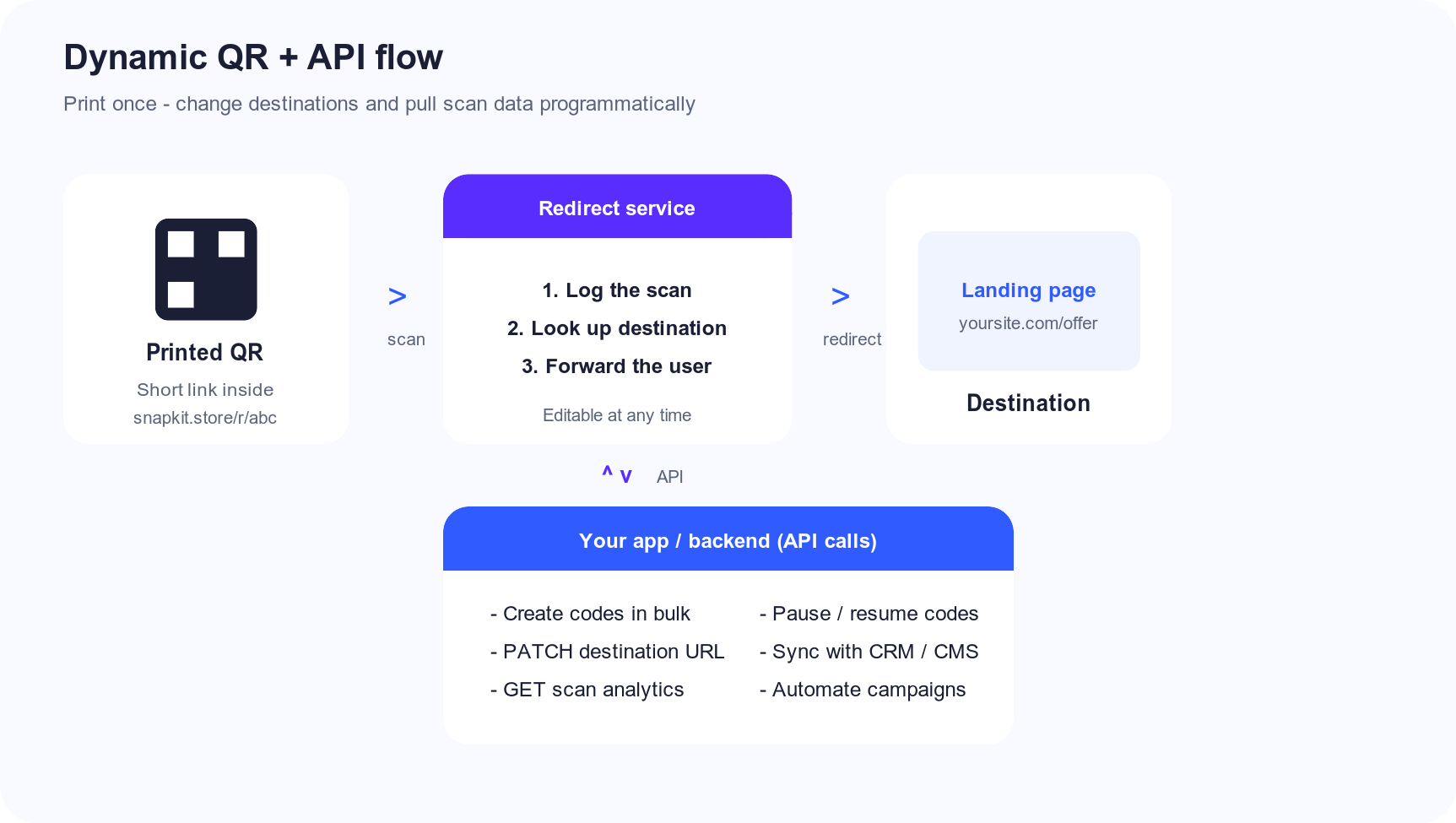
How the Architecture Works
| Layer | What it does | API-friendly? |
|---|---|---|
| Printed QR pattern | Encodes a short URL only | No (print once) |
| Redirect service | Maps short code → current destination; logs scans | Yes |
| Destination page | Your site, app, PDF, menu, etc. | Your own APIs |
| Your backend | Creates/updates codes; reads analytics | Calls the QR API |
Typical endpoints look like this (shape varies by provider):
POST   /v1/qr-codes              # create a dynamic code
PATCH  /v1/qr-codes/{id}         # change destination_url
GET    /v1/qr-codes/{id}/scans   # pull analytics
DELETE /v1/qr-codes/{id}         # disable or remove
Example: your e-commerce system retires a promo. Instead of reprinting shelf tags, a cron job sends PATCH with the new URL. Every printed code keeps working—only the redirect record changes.
For the encoding basics behind the printed pattern itself, see how QR codes work.
What You Can Automate
Bulk creation. Generate a code per store, SKU, flyer, or event seat from a spreadsheet or product feed.
Destination updates. Swap seasonal offers, fix typos, or point old packaging at a new PDP without a reprint.
Analytics sync. Pull scan counts, timestamps, and coarse geo into your warehouse or BI tool.
Lifecycle control. Pause a code after a campaign ends so scanners see a clean “offer ended” page instead of a 404.
Integration glue. Trigger updates from Shopify, Contentful, HubSpot, or a custom admin when content changes.
None of that works cleanly with pure static codes. You'd regenerate images and redistribute physical materials every time something moves.
Dynamic QR Code API Use Cases
You don't need an API for every dynamic QR use case.
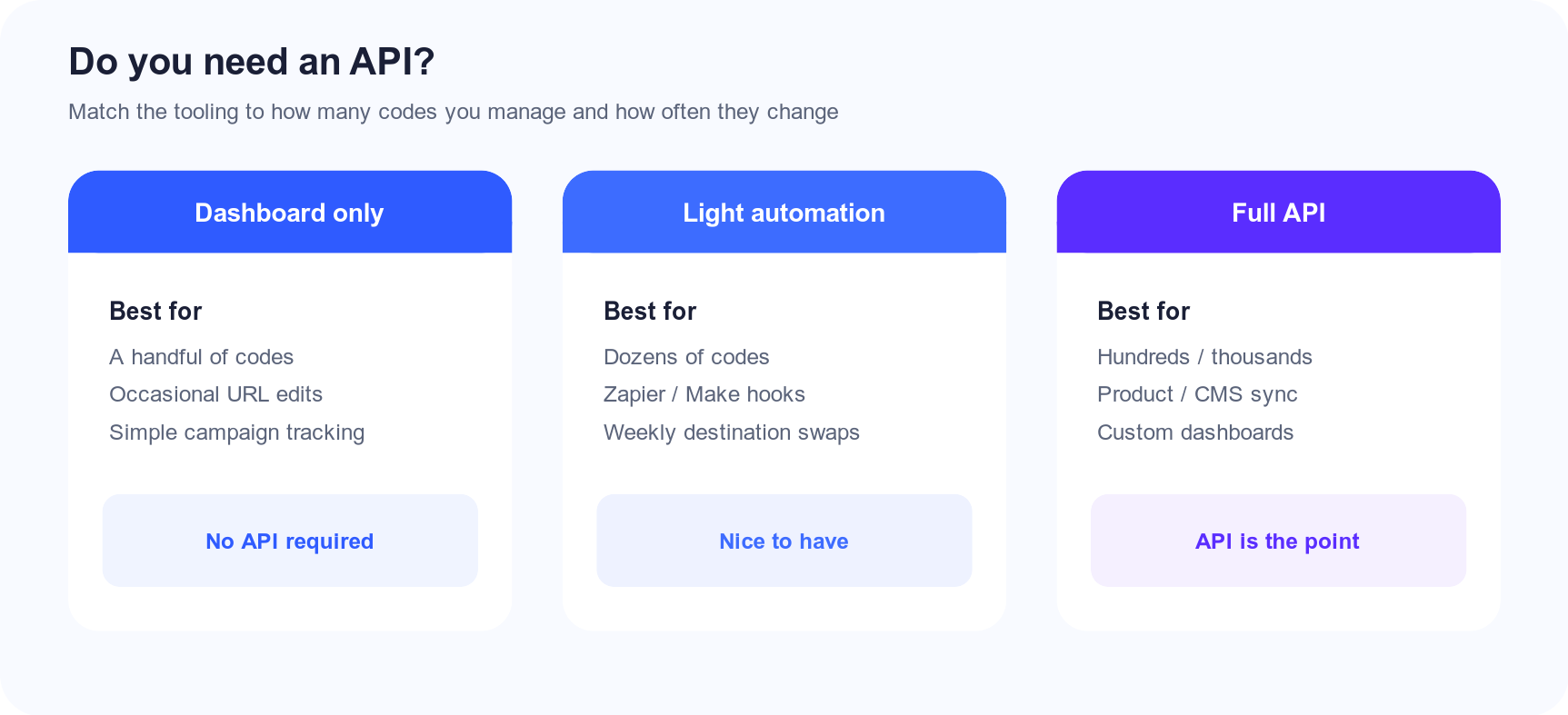
| Approach | Scale | Effort | Good fit |
|---|---|---|---|
| Dashboard only | A few codes | Lowest | Restaurants, local campaigns, one-off events |
| No-code automation (Zapier/Make) | Dozens | Medium | Marketing teams without engineers |
| Full REST/GraphQL API | Hundreds–thousands | Highest | Platforms, marketplaces, multi-location brands |
If you're manually editing three menu QR codes twice a year, a dashboard is enough. If you're provisioning a code per retail location every Monday from inventory data, you want an API.
When a Dynamic QR API Is Worth It
Multi-location businesses. One code (or one short code) per store, managed from a central system of record.
Product packaging at volume. Codes printed months ahead; destinations must stay correct as catalog URLs change.
SaaS / white-label products. Your product creates QR codes for your customers—can't click through a third-party UI for each one.
Campaign ops. Rotate A/B landing pages, expire promos on a schedule, or fan out region-specific destinations.
Compliance and audit trails. Programmatic create/update logs beat “someone changed it in the UI last Tuesday.”
If none of those apply, paying for (or building against) an API is usually overkill. Start with static codes or a simple dynamic dashboard and graduate when volume forces the issue.
What an API Does Not Magically Solve
Print mistakes. Wrong short code on the box still needs a reprint (or a sticker). The API only helps after the correct short link is in the wild.
Dead domains. If your destination domain expires, every redirect lands nowhere. Control the final URL.
Subscription dependency. Dynamic codes rely on the redirect host staying online. Stop paying or lose the service, and scans break—API or not. See Do QR codes expire?.
Identity of the scanner. APIs return aggregate scan telemetry, not “who” scanned. Same limits as QR analytics in general.
Static Codes, APIs, and Homegrown Redirects
Three practical patterns:
-
Static QR → your own short links. Encode
yoursite.com/r/summerand handle redirects in your app. You “have an API” because you own the redirect table. The QR itself stays static and permanent. -
Static QR → UTM landing pages. No destination edits, but analytics via your existing site tools. Fine for fixed campaigns.
-
Vendor dynamic QR + vendor API. Fastest if you don't want to run redirect infrastructure, auth, abuse protection, and uptime yourself.
Option 1 is popular with engineering teams: free static generation (e.g. Snapkit), plus redirects you already operate. Option 3 wins when you want hosted analytics and editable destinations without building that stack.
Where Snapkit Fits Today
Snapkit Dynamic is built around editable destinations and scan analytics in the product UI. A public developer API for programmatic bulk management isn't the focus right now—we're optimized for creating and managing codes in the browser and dashboard.
If you need API-scale provisioning today, either:
- run redirects on your own domain and encode those URLs in free static Snapkit codes, or
- use a specialized QR API vendor for high-volume automation,
…and keep Snapkit for print-ready static assets and dashboard-managed dynamic codes as those features roll out.
FAQ: Dynamic QR Codes and APIs
Can dynamic QR codes be used with an API?
Yes. The printed pattern stays stable; the redirect record is what your software creates, updates, and queries.
Does scanning a QR code call my API?
No—not directly. Scanners hit the short redirect URL. Your API (or the vendor’s) manages that redirect and optional analytics behind the scenes.
What can a dynamic QR code API automate?
Bulk creation, destination changes, scan analytics export, pause/resume, and sync with CRM/CMS tools.
When do I need an API instead of a dashboard?
When codes are inventory—dozens to thousands—updated by systems, not by someone clicking around a UI a few times a month.
Does Snapkit offer a public dynamic QR API?
Not as a public developer product today. Use Snapkit Dynamic in the dashboard for editable links and analytics, or pair free static codes with redirects you host yourself.
The Bottom Line
Dynamic QR codes and APIs are a natural pair: the printable pattern is stable; the redirect record is mutable and queryable. That's the whole point of the dynamic model.
Use a dashboard when you have a handful of codes. Use an API when codes are inventory—created, updated, and reported on by software.
Need a permanent code with no server dependency? Create a static QR in seconds. Need editable links and analytics as we ship more of that stack? Start with Snapkit Dynamic →
Ready to create your QR code?
Try Snapkit's free QR code generator - no signup required.
Generate QR Code