What a Snapkit Dynamic QR Scan Record Actually Stores
The columns written when a phone hits a Snapkit /r/ link: server clock, user agent, country, city, referrer, a daily hash, and the scan counter, and which of those the dashboard draws.
A dynamic Snapkit code encodes a short link. This page is the row the server writes when a phone requests that link: the source of each value, and whether the dashboard shows it.
What QR platforms in general can track is QR code tracking and analytics. How a short link differs from a payload baked into the pattern is static vs dynamic QR codes.
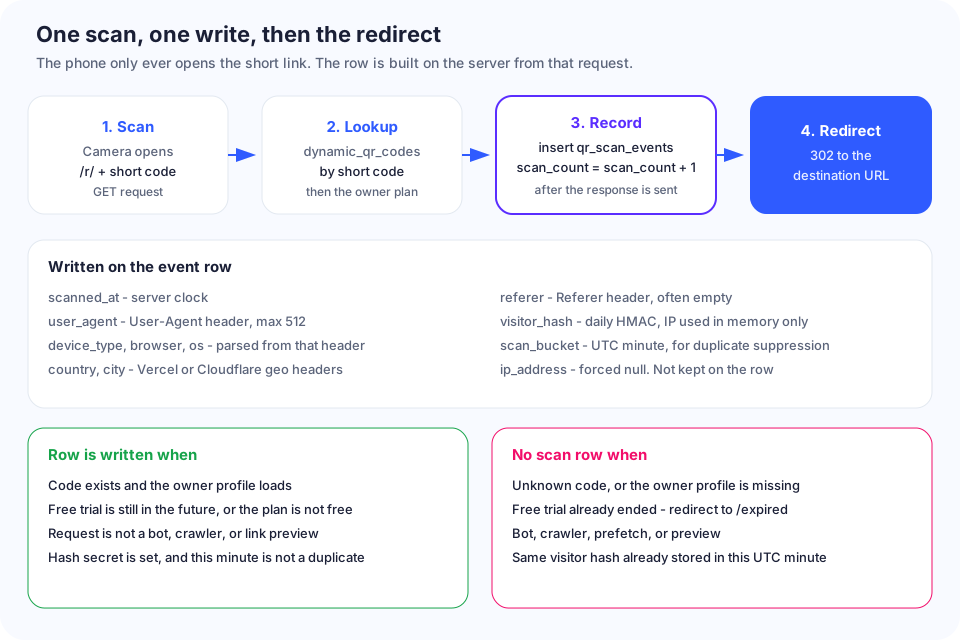
What has to be true before a row exists
The GET handler for /r/ plus the short code loads dynamic_qr_codes. A scan row is an insert into qr_scan_events. scan_count lives on the QR and a trigger adds 1 after a new insert.
All of these have to hold:
- The short code exists. An unknown code goes to the homepage with an error and writes nothing.
- The owner profile loads. A missing profile redirects with an error and writes nothing.
- On plan
free,trial_ends_atis still in the future. An ended trial goes to/expiredand writes nothing. Other plans skip that check. - The request is not a bot, crawler, preview fetcher, or command-line client, and not a
Purpose/Sec-Purposeof prefetch or preview. Those still redirect. They get no row. - A hashing secret is set (
QR_ANALYTICS_HASH_SECRET, otherwise the service role key). Otherwise the handler logs and skips the insert. - This visitor hash is not already stored for this code in this UTC minute. Duplicates on
qr_code_id,visitor_hash, andscan_bucketare ignored, so the counter does not move.
The write runs after the response. A failed insert leaves the phone on the way to the destination and leaves the scan out of both the table and the counter. The terms do not warrant complete analytics.
Columns on the scan row
| Field | What is stored, and the source | Shown in the dashboard? |
|---|---|---|
id | Random UUID | No. React key only |
qr_code_id | QR id from the lookup | No. Selects which page |
scanned_at | Server clock at the start of the analytics task, ISO timestamp | Yes. Recent Scans time in UTC, plus today / 7-day / 30-day counts |
scan_bucket | UTC minute of scanned_at. Handler sends it; a before-insert trigger sets it from scanned_at | No. Duplicate key |
visitor_hash | 64-hex HMAC. Key rotates each UTC date. Memory-only inputs: IP or "unknown", user agent, Accept-Language, Sec-CH-UA hints | No |
user_agent | User-Agent, control characters removed, max 512 | No |
device_type | mobile, tablet, desktop, or unknown if the header is empty | Yes on Unlimited: Device column and pie |
browser | First matching family name. No version. Empty header stores Unknown | Yes on Unlimited: Browser column and pie |
os | First matching OS name. Empty header stores Unknown | Yes on Unlimited: OS column. No OS chart |
referer | Referer or Referrer, max 2,048. Camera apps usually omit it | Returned by the analytics function. Not drawn |
country | x-vercel-ip-country, else cf-ipcountry, only if exactly two letters A-Z | Yes on Unlimited, in Location |
city | x-vercel-ip-city only, max 128, percent-decoded when that works | Yes on Unlimited, only with a country |
ip_address | Legacy column. Insert trigger sets null. Handler sends no IP | No |
scan_count is not on this row. Each accepted insert adds 1 on the QR. The code list prints that number beside the word scans. The detail page prints it as Total Scans / All time.
Where the labels come from
Clock. scanned_at is the server clock. Recent Scans prints it in UTC with the short zone name. Today is scanned_at at or after 00:00 UTC (caption "Since midnight"). The week card is 00:00 UTC seven days ago ("Last 7 days"). The 30-day card is 00:00 UTC thirty days ago, and the caption divides that count by 30.
Device. A present user agent starts as desktop. Mobile is tested first (the word mobile, iPhone, iPod, Android unless tablet is also in the string). Tablet is second (tablet, iPad, or Android with tablet). An iPad agent that contains Mobile is stored as mobile. Only an empty header is unknown.
Browser, first hit: Edge (edg/), Chrome (chrome, and not chromium), Firefox (firefox), Safari (safari without chrome), then Opera, Internet Explorer, Samsung Browser, or Other. Opera and Samsung Internet also contain chrome, so they are stored as Chrome. iPhone Chrome (CriOS) and iPhone Firefox (FxiOS) miss those spellings and still contain Safari, so they are stored as Safari.
OS, first hit: Windows, macOS (mac os or macos), iOS, Android, Linux, Chrome OS (cros), or Other. iPhone and iPad agents include "Mac OS X", so the stored OS is macOS. Android is tested before Linux.
Place, referrer, hash, IP. Country and city are proxy headers, not GPS. City is only x-vercel-ip-city. get_scan_analytics returns referer; Recent Scans does not. The hash is HMAC-SHA256 with a key that mixes the UTC date into the secret. IP is the first parseable address in x-vercel-forwarded-for, cf-connecting-ip, x-forwarded-for, or x-real-ip. Language and client hints are hash inputs, not columns. The before-insert trigger sets ip_address to null, and the analytics function does not return it.
What you see after you sign in
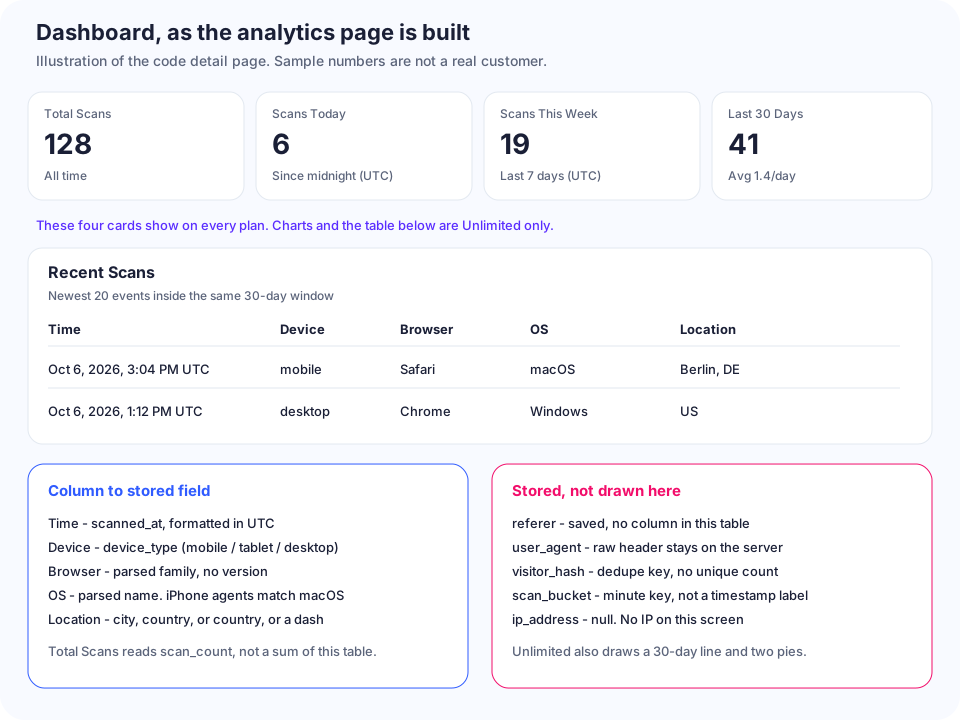
Every plan that can open a code sees four cards. Total Scans is scan_count. The other three count event rows in the UTC windows above.
Plan unlimited calls get_scan_analytics for the 30-day window and, when it has events, draws Scans Over Time, Device Breakdown, Browser Breakdown, and Recent Scans (newest 20: Time, Device, Browser, OS, Location). Location is Berlin, DE when both parts exist, the country code alone, or a dash, including when city is set and country is empty. Mobile uses a phone icon. Desktop and tablet use a monitor icon.
Free, Starter, and Pro keep the four counts and a locked Detailed Analytics card. Owners can select only id, qr_code_id, and scanned_at on the events table. Detail columns come only from get_scan_analytics, which returns nothing unless the caller owns the code and the plan is unlimited.
What Snapkit does not record
| Not on the scan record | What the code does instead |
|---|---|
| Raw IP address | Read for the hash, then dropped. ip_address is null |
| GPS, street, or country name | Only proxy headers, and only when they pass the checks above |
| Browser version or phone model | Family label only |
| Language or client hints as fields | Hash inputs only |
| Scanner name, email, or user id | The row points at the QR |
| A unique-visitor total | No screen groups by visitor_hash |
| A second row in the same UTC minute | Ignored, so scan_count stays put |
| Bot, crawler, and link-preview hits | Redirect only |
| Scans after a free trial ends | /expired before the analytics block |
The privacy policy scan list names IP address, browser type and version, OS, device type, referring page, and date and time. This handler stores OS, device type, a browser family with no version, the referrer when sent, and the server time. It stores no raw IP. Country, city, the raw user agent, the hash, and the minute bucket are stored and are not in that list. Section 7 keeps analytics while the QR exists and the account stays active. A migration defines a private cleanup function with a 90-day default and does not schedule it. This app does not call it. Cite /privacy.
Before you quote a number
- Total Scans is every accepted insert. Last 30 Days is only that window.
- The same hash twice in one UTC minute counts once.
- A link preview that matches the bot check is left out, and an ended free trial never reaches the destination.
- On Unlimited, a normal iPhone agent shows macOS, and iPhone Chrome shows Safari.
I am Andrei Haiducu (Haiducu Development). If a column on your analytics page disagrees with this list, email [email protected]. Legal wording stays on Privacy.
Ready to create your QR code?
Try Snapkit's free QR code generator - no signup required.
Generate QR Code