QR Codes for Weddings: Invitations, RSVPs, and Guest Day-Of
Add one QR code to wedding invitations for RSVPs without wrecking the stationery—plus day-of codes for photos, programs, and maps. Print specs, tests, and etiquette.
One Job Per Square
Wedding stationery is already doing too much: names, date, venue, dress code, hotels, meals, plus a URL nobody wants to type on a phone keyboard.
A QR code is worth adding when it removes one of those jobs—almost always RSVP—without turning the suite into a trade-show badge. It is not worth adding as décor on every insert.
This guide is the whole wedding QR playbook: what the invitation code should encode, where it sits, how to proof it on paper, and which separate codes belong on the day (photos, programs) so you do not print five identical squares.
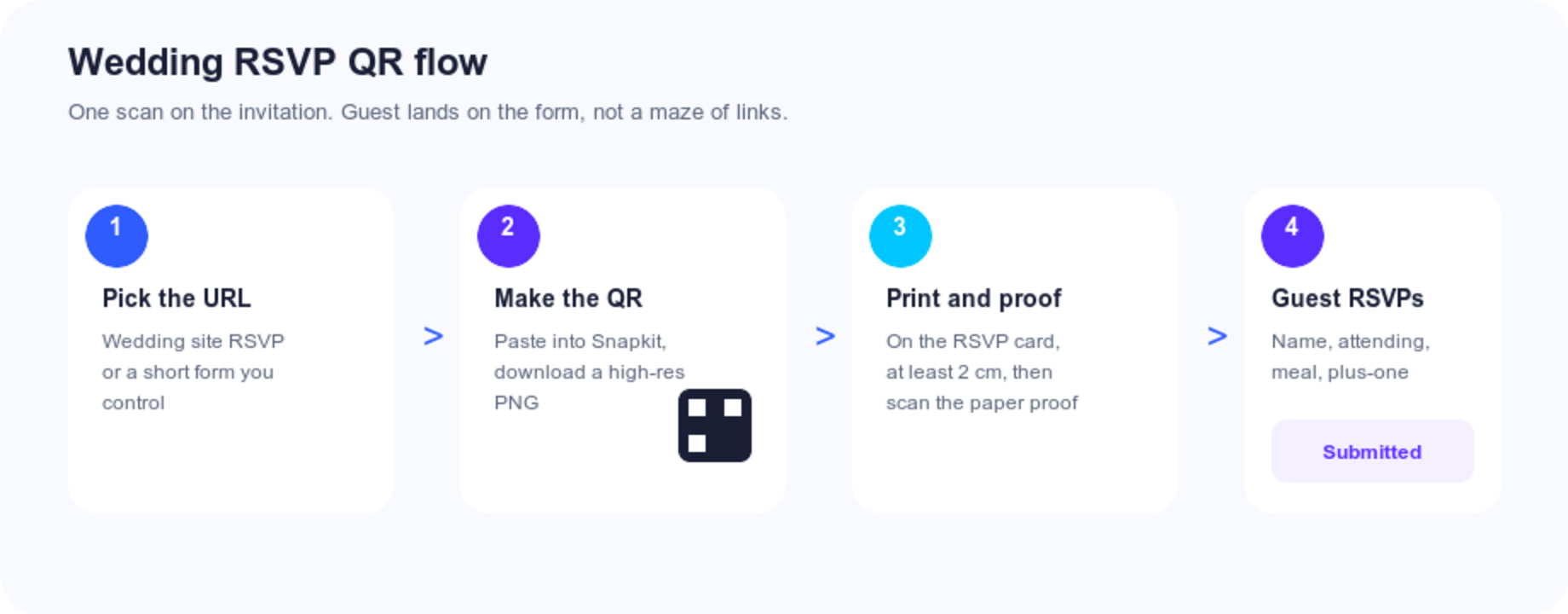
What the Invitation QR Should Open
Pick the destination before you generate anything. Guests will scan once. If they land on a homepage with eight buttons, a lot of them close the phone.
| Destination | Guest sees | Best when | Risk |
|---|---|---|---|
| Wedding website RSVP page | The form, immediately | You already use Zola, The Knot, WithJoy, or similar | Page URL must stay stable through the deadline |
| Short form you control (Google Form, Typeform) | A four-field form | You want meal + plus-one without a full wedding site | You must not delete the form after the mailer goes out |
| Full wedding website home | Navigation, then RSVP | You also need hotels, schedule, registry in one place | Extra taps; some guests never find RSVP |
| Google Maps pin only | Directions | The venue is genuinely hard to find | Does not collect the RSVP |
| Instagram / registry / Linktree | Social or shopping | Never on the invitation | Wrong job for a formal mailer |
For most couples the winning invitation payload is the RSVP URL, not the homepage and not a map. Put hotels, parking, and the weekend timeline on the wedding site; the code can still open the RSVP page with a link back to those details.
Keep the URL short. yourwedding.com/rsvp produces a simpler pattern than a 120-character tracking link, which matters at invitation sizes.
Fields that belong on the form
If the scan opens a novel, people abandon it in the driveway.
Keep: full name (or household), attending yes/no, plus-one name if you allow one, meal choice, a free-text allergy box, RSVP deadline in the description.
Skip on the invitation form: registry browsing, hotel checkout, Spotify requests, “upload an engagement photo.” Those are website or day-of jobs. Every extra field is a guest who says they will finish it later and never does.
Test the form on a phone in one hand, standing up—the posture people actually use when they scan a card at the kitchen counter. If a dropdown is unusable, replace it with large tap targets.
Do not encode a Google search for your names. Results can show the wrong couple or a vendor ad. Same class of mistake as a review QR that opens a search page instead of the form.
Where It Goes on the Suite
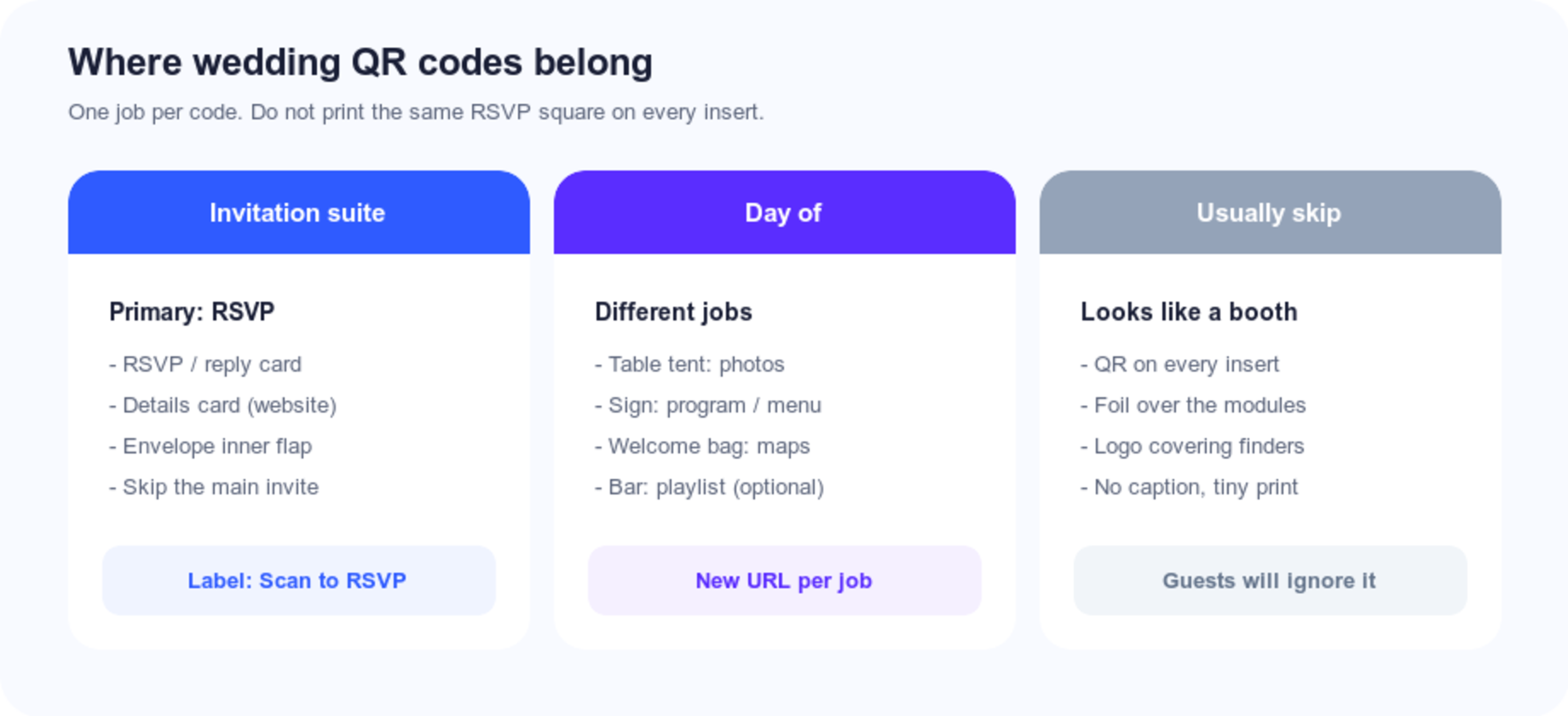
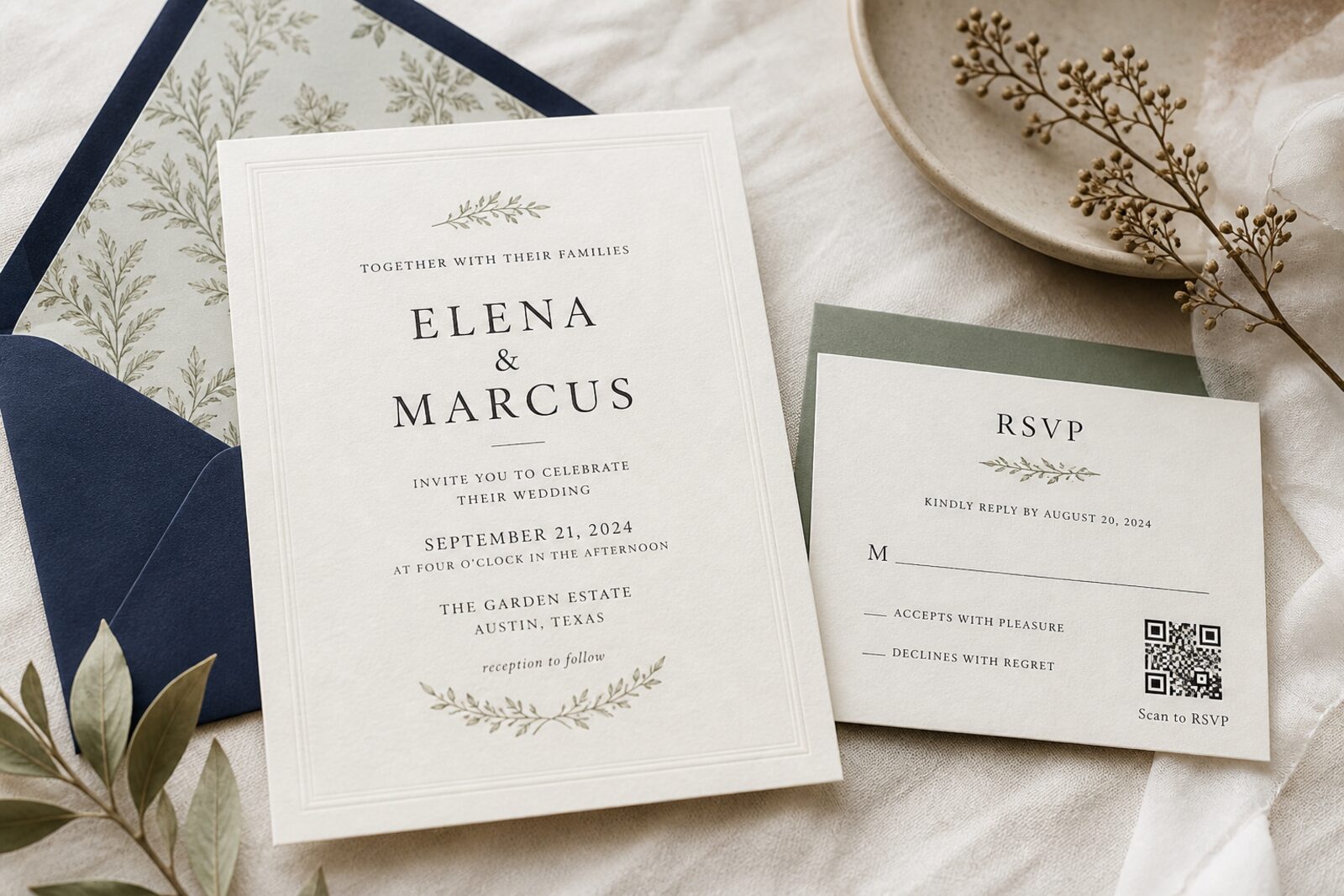
The main invitation is the formal piece. The reply card is already about taking action. Put the code where action already lives.
| Placement | Why it works | Watch-outs |
|---|---|---|
| RSVP / reply card | Guests expect to respond here | Minimum ~2 cm / 0.8 in; caption “Scan to RSVP” |
| Details card | Natural home if the code opens the full website | Do not also put a second RSVP code on the reply card |
| Envelope inner flap | Hidden until they open it | Easy to miss; still print a short URL on a card |
| Main invitation | Only for modern, sparse designs | Feels like a conference badge on traditional letterpress |
| Every insert | — | Looks cheap. One invitation code is enough |
Leave a quiet zone so foil, crests, and borders do not touch the modules.
Create It, Then Proof It on Paper
-
Copy the RSVP URL (HTTPS, mobile-friendly, deadline in the form copy).
-
Paste it into Snapkit and download a high-resolution PNG. Do not screenshot the preview.
-
Place it at final print size. Dark modules on light stock. If the paper is blush or sage, sit the code on a white panel.
-
Skip logos, rounded “artistic” modules, and foil stamping over the pattern. Invitation lighting is often warm and dim; contrast mistakes show up at the table, not on your laptop.
-
Print a paper proof at actual size on the real stock (or the closest you can get). Scan it with an iPhone camera and an Android camera. Have one other person scan it too.
-
Dim the lights to something like a reception (warm bulb, not a ring light). If it only scans under your desk lamp, enlarge the code or raise contrast. Guests will not pull out a flashlight to reply.
If the proof fails, fix size, contrast, or URL length before you approve 150 letterpress runs.
A static QR code is the default for invitations. You print once. You do not want RSVPs tied to a subscription that can go dark. If you might change form tools, encode a URL you control (yourdomain.com/rsvp) that redirects to Zola or Google Forms. Then the printed square never changes.
Use dynamic only if you already know you will swap destinations after the boxes ship and you accept that the redirect has to stay hosted.
Keep a Paper Path (Hybrid RSVP)
Some guests will not scan. That is not a design failure.
A suite that converts:
- QR on the reply card, labeled
- Short URL in plain type (
yourwedding.com/rsvp) - Name + attending + meal lines for people who mail the card back
- Pre-addressed envelope if you are doing paper replies
Younger guests tend to scan. Older relatives tend to write. You get a higher response rate than QR-only or mail-only, and you are not deciphering as much handwriting.
Set the form to email you on each submit. Send a polite reminder to people who have neither scanned nor mailed by two weeks before the deadline—not a guilt trip the week of the wedding.
Day-Of Codes Are a Different Job
Do not reprint the invitation RSVP code on napkins. If someone still has not replied, a table tent will not fix your headcount.
Day-of codes should open something guests need that night:
Guest photos. A shared Google Photos album, Aftershoot-style guest gallery, or The Guest-style uploader. Put it out at cocktail hour while batteries and goodwill still exist. Caption: “Scan to add your photos.” A code at midnight next to the cake is too late.
Ceremony program / reception menu. One sign at the entrance, or one small card per table, beats a stack of paper programs you will run out of. Include order of service, wedding party, allergens. Guests with dietary needs will actually use this.
Maps and weekend schedule. Welcome-bag card or hotel-night insert. This is the map/parking payload that does not belong on the formal invite if the invite code is RSVP.
Registry. Bridal-shower insert or wedding website—not the invitation, in cultures where registry-on-the-invite reads as a gift grab. Link to your registry hub, not three store URLs as three QR codes.
Each of those is a new URL and a new caption. Two or three codes across the whole wedding is plenty. Five codes in the invitation envelope is how you get the “tech conference” look.
Conference-style check-in and ticketing live in the events guide, not on a reply card.
Stationery Rules That Keep It Elegant
Contrast first. Navy, charcoal, or burgundy on ivory scans. Gold foil on blush does not, even if the suite is beautiful. If you want color, follow the contrast rules and proof on the real paper.
Size. Arm’s-length scan on a card: about 2 cm (0.8 in) minimum. Table tents and easels can go larger. Dim reception lighting is less forgiving than your kitchen island.
Caption. “Scan to RSVP” or “Scan for photos.” A naked matrix looks like a tracking mark.
Texture and finish. Heavy cotton, letterpress bite, and glossy laminate all eat scannability. Matte or uncoated around the code. If the rest of the suite is foil-stamped, keep the QR in a flat ink patch.
One primary invitation code. The RSVP square. Everything else waits for the website or the day-of signage.
Common Mistakes
Encoding the wedding-website homepage when you meant the RSVP form. Extra taps kill replies.
A URL you do not control. If The Knot slug changes, or a free shortener dies, every mailed invite is wrong. Prefer a domain you own plus a redirect.
Printing before both phones scan the paper proof. Screens lie. Cotton stock lies more.
QR on the main invite and the reply card and the details card. Guests will assume they are different links, scan one, and ignore the rest.
No paper fallback. You will spend August explaining how to scan to someone’s uncle.
Day-of photo album that requires an account before upload. Use a guest-friendly album. Friction at cocktail hour means you get twelve photos, all from the wedding party.
Treating Test/preview form URLs as final. Edit the live form, then generate the code.
Pre-Mail Checklist
| Check | Pass? |
|---|---|
| Destination is the RSVP URL, opened on a phone | |
| Caption on the card (“Scan to RSVP”) | |
| Short URL printed as text | |
| Code ≥ 2 cm with a clear quiet zone | |
| Dark on light; no foil on modules | |
| Paper proof scanned on iPhone and Android | |
| Form still live, deadline visible, meal fields correct | |
| Hybrid paper reply still possible |
One miss on this list is cheaper to fix on a proof than on a calligraphed outer envelope.
FAQ: Wedding QR Codes
Should I put a QR code on the invitation?
Yes—on the reply or details card, one job, labeled. Not as decoration on every piece.
What should it link to?
The RSVP page or a short form you control. Maps and registries are different codes, different moments.
Will it look tacky?
Only if it is tiny, unlabeled, foiled, or sitting on the most formal card. A clean 2 cm code on the RSVP card reads as practical.
Do I need a dynamic QR code?
Not for a stable wedding-site URL. Encode a domain you control if you might change tools. Choose dynamic only when you must edit after printing.
What about guests who will not scan?
Print the short URL and keep a paper reply. Hybrid suites outperform QR-only mailers.
The Bottom Line
A wedding QR code earns its place when it collects the RSVP without asking guests to type a novel on a phone, and when the suite still works for people who will never open a camera.
One invitation code. A paper fallback. A proof on real stock. Separate, clearly labeled squares for photos or programs on the day—if you need them at all.
Ready to create your QR code?
Try Snapkit's free QR code generator - no signup required.
Generate QR Code