vCard Fields Snapkit Actually Encodes
The Contact tab on snapkit.store maps six form fields to vCard 3.0. Here is the exact mapping, what is missing, and how iPhone and Android save the result.
The Snapkit homepage has a Contact tab, not a generic “paste any vCard” designer. If you expect a job title, a headshot, or two phone numbers, the form will not invent them. This page is the field list as implemented—not a tour of the full vCard spec. For format background see the existing vCard guide.
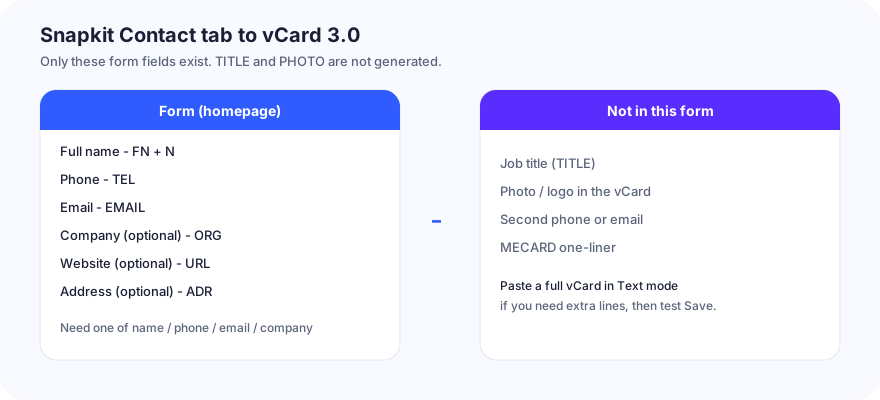
The six inputs
You need at least one of: name, phone, email, company, website, or address. An empty form does not produce a downloadable code (the preview stays a placeholder).
| Form label | Encoded as | Notes |
|---|---|---|
| Full name | FN: plus N: | N is built by splitting on spaces and reversing (Jane Roe → N:Roe;Jane;;;). Middle names become part of the reversed chunks. |
| Phone | TEL: | Typed as-is. Prefer + and country code. |
EMAIL: | Typed as-is. | |
| Company (optional) | ORG: | Organization only. There is no Title field. |
| Website (optional) | URL: | Type a full https://… if you want a tappable site. |
| Address (optional) | ADR:;;{your text};;;; | One line dumped into the street slot. Not structured city/region/postal. |
Wrapper is always:
BEGIN:VCARD
VERSION:3.0
…fields…
END:VCARD
Generation is in the browser. The vCard string is not uploaded unless you later use an unrelated dynamic URL account feature. Dynamic is for website destinations, not for editing a printed contact card. See how Snapkit generates codes.
What you will not get from this tab
- TITLE (job title)
- PHOTO
- Second
TELorEMAIL - NOTE, social profile URLs, birthday
- MECARD compact format
- A logo inside the vCard (homepage logo customization, when entitled, is a picture on the QR image, not a PHOTO field)
If you must have TITLE:, paste a complete vCard 3.0 into the Text tab and test Save Contact on both phone brands. Text mode will not guarantee a save sheet—some cameras show raw text.
Density vs a business card
Every extra optional field adds modules. A name + mobile + email stays scannable around 15–20 mm on a standard card if contrast and quiet zone are intact. Name + phone + email + company + long HTTPS + a full mailing address often needs a larger mark or a cleaner payload.
| Payload | Typical print advice on Snapkit PNGs |
|---|---|
| Name + TEL + EMAIL | ~0.6–0.8 in if you use the download (not a screenshot) |
| All six fields, long URL | Closer to 1 in; test before a box of 500 |
| Pasted novella in Text | Wrong tab; use a URL to a contact page |
Download is PNG at roughly 1024 px; the widget preview is 256 px. Do not screenshot the widget for press. Details: testing a Snapkit PNG.
iPhone vs Android after a Snapkit Contact scan
- iPhone Camera usually offers Add to Contacts when the payload starts with
BEGIN:VCARD. If you only see text, you probably used Text mode or cropped the quiet zone. - Android (Pixel / Samsung / Lens) may show the card, or open the string first and ask you to save. OEM cameras differ. Test the same PNG on both.
- Scanning twice creates a second contact. Snapkit does not dedupe.
N:from a single-word name (Madonna) becomesN:Madonna;;;— odd but saveable. Two-word Western names reverse as above. If your culture’s name order is not “given family,” type FN-friendly Full name and verify the saved Last / First split.
Build checklist (this product)
- Open snapkit.store, choose Contact.
- Fill only fields you want public. The printed code is the data.
- Download PNG. Scan on iPhone and Android. Open the saved contact and read every line.
- If
N:looks wrong, shorten Full name or accept FN as the display name. - Print with a quiet zone. If the card art is dark, put the code on a white patch.
A Snapkit contact QR is a static card. Change your number later and you reprint—or switch the print to a short URL you control. Do not expect the Contact tab to become a dynamic vCard editor. It does not.
Ready to create your QR code?
Try Snapkit's free QR code generator - no signup required.
Generate QR Code